Feeds:
Posts
Comments

Posts Tagged ‘informatica’

Brevemente (dato che sono a lezione), giro ai lettori una “chiamata alle armi” per il desktop semantico di KDE, tema che mi sta molto a cuore, più che altro perchè ritengo la semantica il futuro dell’informatica (banalmente…), sia in ambito desktop che in ambito Web.

Insomma, come scritto qui, se siete curiosi o interessati alla semantica, se avete un po’ di tempo da spendere per interessarvi a tecnologie decisamente eccitanti (e con possibili sbocchi accademici, se vi interessa ci sono fior fior di ricercatori che se ne occupano), fate un giro su nepomuk.kde.org, curiosate ed iscrivetevi alla mailing list ufficiale.

Non è un compito semplice, e non sempre è tutto facilmente comprensibile, ma vi assicuro che è indubbiamente tutto molto divertente!

Read Full Post »

Rosegarden 2

Rosegarden 2

Ecco uno splendido screenshot della versione di sviluppo di Rosegarden, che porterà verso la 2.0, con il porting (ancora in corso) alle Qt4… così di primo acchito l’impianto grafico è sostanzialmente lo stesso, non male anche il tema dark. Inutile dire che noi musicofili del pinguino aspettiamo ansiosamente l’uscita della stabile.

Read Full Post »

Ho finalmente iniziato a programmare un po’ in Erlang, in vista di quando dovrò iniziare a scrivere codice seriamente per la tesi (di cui parlerò più avanti, ora siamo parecchio agli inizi), ed oggi ho fatto un test estremamente semplice per giocare un po’ con il codice mobile.

Premesso infatti che Erlang favorisce il codice distribuito e la comunicazione tra nodi e processi remoti, mi sono chiesto se era possibile far muovere non solo dati (quindi variabili, anche se forse il termine variabile in questo contesto non è del tutto adatto, dato che sono immutabili), ma anche codice vero e proprio, in particolare funzioni e closure. E la risposta, naturalmente (e sorprendentemente), è stata: sì.

Modulo

Modulo

Il modulo qui sopra, dal comportamento piuttosto scontato, esporta un’unica funzione che riceve due parametri: una funzione (o meglio, una funF ed un valore Value, e non fa altro che invocare la prima passando il secondo; se F non è una funzione, il programma va democraticamente in crash, altrimenti ritorna il risultato di F (Erlang non richiede alcuna parola chiave return).

Questo modulo, debitamente compilato, è stato copiato in due computer diversi, che ho chiamato big e little, principalmente perchè il primo è il notebook ed il secondo è il netbook 🙂

Nodo big

Nodo big

Questa è la console del notebook: assegnato un nome di rete completo al nodo ed un cookie (e segato il firewall, forse ho sbagliato ad aprire la porta giusta per far comunicare Erlang), ho lanciato l’interprete e l’ho lasciato lì: il codice visto sopra non ha bisogno, infatti di essere in alcun modo avviato (ho anche creato una versione server, lievemente più complessa, ma il risultato è lo stesso anche con 2 righe 2 di codice), basta assicurarsi che l’interprete sappia dove trovare il file compilato, se ne avrà bisogno (ovvero se mai qualcuno dovesse richiedere una delle sue funzioni): nel caso più semplice basta lanciare l’interprete erl dalla cartella dove si trova tale file.

Nodo little

Nodo little

E qui, sul nodo little, avviene il bello: anche qui è necessario assegnare un nome di rete e lo stesso cookie di cui sopra (e lanciare l’interprete sempre dalla directory contente il file compilato, debitamente copiato dal primo nodo); a questo punto, ho dichiarato una funzione Double, che altro non fa che ricavare il quadrato del parametro, lanciarla in locale e successivamente in remoto, tramite la chiamata ad rpc:call(). Ed ha funzionato!

Cos’è successo

In pratica, nel secondo nodo è stata creata una fun, ovvero una funzione anonima assegnata ad una variabile; essendo la funzione appunto anonima, il suo codice non era a priori conosciuto dal primo nodo, dato che la sua implementazione (X*X) non era situata nel modulo presentato più sopra (che costituiva l’unico listato comune ai due nodi), bensì salvata in qualche modo direttamente nella variabile Double.

Quando tale variabile è stata inviata al nodo remoto, essa ha portato con sè tale implementazione, così che il nodo remoto è stato in grado di eseguirla e restituire al chiamante il risultato (4). Spettacolare!

Read Full Post »

Oggi inizia il mio sesto anno di università, inizialmente non previso (come si può ben immaginare), ma ormai siamo in ballo…

L’anno appena conclusosi non esiterei a definirlo campale, almeno da un punto di vista universitario e dintorni: la partecipazione al Google Summer of Code ha coronato un annetto nella media, e la tesi probabilmente trasformerà in maniera simile anche quello che sta per iniziare (e che deve essere campale anche lato esami e voti).

Anyway, è uscito l’altro giorno l’articolo sui ragazzi che hanno partecipato per KDE al Summer of Code 2009: ovviamente ci sono anch’io, ma anche tantissimi altri progetti, più o meno spettacolari: leggete leggete! Intanto su Mandriva 2010 RC1 hanno integrato un sacco di migliorie di Nepomuk, e con KDE 4.3 dovrebbe essere diventato anche più semplice testare anche smartsave, vi farò sapere prossimamente.

Read Full Post »

Oggi è stata una giornata decisamente soddisfacente dal punto di vista informatico e linuxiano in generale, e non potevo non condividere l’avvenimento coi miei 15 lettori…

Erano 10 anni che non compravo una stampante: a quell’epoca infatti risale la mia HP Deskjet 710C, che a tutt’oggi funziona perfettamente; l’unico difetto è che non è qui a Milano, perciò era ora di averne una anche in appartamento. La scelta è caduta su una HP (marca che vince non si cambia) Photosmart C4580, occasione capitata quasi per caso ad un MediaWorld.

Il primo avvio

Al primo avvio, la stampante si rende del tutto autonoma: prima chiede la lingua (dal piccolo display), poi mostra come inserire le cartucce (incluse) e la carta; fatto questo, si stampa la pagina per l’allineamento delle cartucce e se la scannerizza (unico sforzo: inserire il foglio appena stampato nello scanner): già mi torna in mente la 710, per la quale bisognava stampare apposta la pagina ed inserire a mano i valori (operazione per la quale, dopo qualche anno, mi sono ampiamente stufato: ora non le allineo più 🙂 ).

Al termine dell’operazione, la stampante è pronta (e fumante) per funzionare.

Al PC

Linux mi ha reso anche più soddisfatto: ho inserito il cavo USB, e dopo pochi istanti KDE mi comunica che una stampante è stata inserita, e la sta configurando; tempo una decina di secondi (meno di quanto ci avrebbe messo XP, peraltro) afferma che la HP serie C4500 è configurata e pronta a stampare. Spalanco Okular e lancio il primo documento, e tutto va felicemente in porto.

In conclusione

Questo è quanto io chiamo “informatica al servizio dell’uomo”, e non viceversa…

Unico difetto riscontrato finora: non so se Linux supporta il Wireless della stampante: bisognerebbe infatti lanciare il software per Windows presente sul CD, con la stampante collegata, per poterla configurare alla rete di casa, e non ho ancora provato il buon Wine; la speranza però è un po’ flebile, da quel che vedo su Internet…

Non testato (yet): lo scanner.

P.S.: leggo oggi, tra le notizie dei netbook in uscita, che l’eeepc non poteva avere un hard disk più grande di 160 GB a causa delle limitazioni della licenza XP in uso, ed ora invece con Windows 7 possono allargarsi… :O

Read Full Post »

Oggi, finalmente, sono riuscito a reinstallare il buon Remuco, nella nuova e scintillante versione 0.9, che finalmente supporta Amarok 2.x.

Per chi non lo conoscesse, Remuco è un pratico software client/server che permette di gestire via cellulare tutti i più diffusi software audio(/video) per Linux; il server è scritto in Python, mentre il client in J2ME: una volta installato ed avviato il primo, ed il relativo software da controllare, è possibile installare ed avviare il secondo sul proprio telefonino, effettuare il pairing via bluetooth (o a scelta connettersi via Wifi, se supportato da entrambi i device) e quindi avere sotto le proprie dita tutti i tipici controlli di riproduzione e di volume, nonchè la possibilità di muoversi nella playlist.

Esclusa la parte server, che è piuttosto semplice da installare una volta scaricato il pacchetto dal sito indicato, l’unica difficoltà è quella di adattare le proprietà di compilazione del client in base al proprio cellulare: dopo un po’ di tentativi, ad esempio, io ho dovuto ridurre il numero dei temi inclusi, ed al contempo limitare la dimensione delle icone a 12 pixel; solo così facendo, finalmente il telefono ha iniziato a riconoscere il programma ed avviarlo correttamente…

Read Full Post »

If you don’t mind, I would like to leave for a moment the devlopment behind, and ask a question: what do you think about netbooks and development?

I mean, I would like to buy a netbook, and I’ve already found and affordable one, and I’m going to buy it for carrying it around at the university and in conferences, so I can access the Web, chats and things like that with a light instrument; what I’m asking is: for your experience, how is using a netbook in events like hackmeetings or development meetings, for example like the “KDE projectname sprint” ones?

I have already experienced programming on an Atom (I have an eeebox at home, and I had to use it for a couple of weeks while waiting for my new notebook), and of course I had been able to develop some code without much fuss, yes I had to wait some time while recompiling code, but not that much in the end, so is it worth bringing a netbook to that kind of meeting?

The positive aspect is that a netbook is light in dimensions and weight, and I can survive on a 10″ screen for a few days (I had a friend who survived on a 7″ screen for a year!), and I can bring it with me every time (I don’t want to leave a computer in a hotel room, for example…).

Please, comment and tell your opinion! 🙂

Read Full Post »

Dopo il wrap up del Google Summer of Code, ora anche il mio mentore, Sebastian Trueg, ha scritto sui risultati raggiunti finora, ed il lavoraccio degli ultimi 10 giorni ha permesso di arrivare a quanto potete vedere negli screenshots pubblicati finora; c’è ancora da lavorarci, ma già adesso una prima preview (potremmo definirla un’alpha release?) è già usabile.

Sebastian ha pubblicato anche la guida per la compilazione, che vi riporto anche qui:

  1. c’è prima di tutto da applicare una patch alle kdelibs, che speriamo venga integrata per KDE 4.4 ma compatibile anche con la versione 4.3;
  2. poi basta scaricare il modulo di Nepomuk in playground e compilarlo: potete installare tutto oppure compilare ed installare i soli sottomoduli scribo, nepomukutils, annotation e smartsave; consiglio anch’io comunque di installare tutto;
  3. infine è necessario modificare i kdeglobals inserendo una nuova voce, file module=smartfilemodule, nella sezione dedicata a KFileDialog ed alle sue impostazioni.

Ho comunque le migliori intenzioni di preparare sia una versione modificata delle kdelibs 4.3 per Ubuntu, con la patch già applicata, ed un pacchetto contenente il modulo aggiuntivo; tenete d’occhio il mio account su Launchpad per gli aggiornamenti del caso.

Chi l’avrebbe mai detto, ormai 6 anni fa, quando ho installato la mia prima distribuzione Linux (Mandrake) e KDE, che un giorno sarei stato citato dal blog di uno dei maggiori sviluppatori di KDE stesso (l’autore di K3b prima e di Nepomuk ora)… 😀

Read Full Post »

GSoC 2009: wrap up

Since last monday, the 2009 edition of the Summer of Code is over, so it’s time for a summary of the work of my project, what has been done, what has not been done, and what I am doing right now; while reading this, keep in mind the picture you see above, taken from one of the most recent code snapshots of the smartsave dialog system.
The project: a little reminder
My project for the GSoC had the aim of developing an alternative semantic load an save dialog system, through which the user would be able to save meta-informations and interrelations about its files, like associating the current context or the current project, or the pdf version of an OpenDocument file; during the opening operation, a new view of the file system would be produced, so the user should navigate and filter through the previously created metadata, narrowing the possible range of files until it finds out what he/she is looking for.
Why is this important/useful?
This is a question that I often hear, especially from those people who think that a semantic desktop engine is not different from, for example, Google Desktop Search, or similar file crawlers; well, a semantic engine is very different from a crawler: the latter just passively crawls through tons of files, extracting text and allowing a search through keywords, while the former can combine its informations, using mathematical logic rules in a process called reasoning, for expanding the metadata associated to a document and allowing a user to search it through paths he/she hadn’t thought about when saving it.
The semantic desktop is not just this, and a very good introduction to it can be found here: it is worth reading it, believe me.
The new dialog system jumps straight into this view: saving files in the current way is somehow old, and it requires the user to create a reasonable directory path, so he/she will be able to find its file back someday, when he/she will need it; in my view, it should be very useful if we are able to associate to a document some informations, about its contents or about the contest in which we have created it, without bothering with a file system structure: wouldn’t it be easier to search for it later?
What has been done in these three months
Ok, so what do we have now? During this GSoC, I have created a new UI, similar in certain aspects but different in others to the current one; an interface to some plugins which are able to analyze file content and extract possible metadata, also querying some online services like OpenCalais; the user is also able to associate personalized metadata.
The open dialog presents a full list of files, comprehensive of those indexed by Strigi, with a list of filters for narrowing the search; the filter system is very similar to the faceted browsing system which you can find on many Web sites.
Currently, files are saved in ~/Nepomuk, with a file path that can be explored also through the standard file manager; the name and the path automatically given by the dialog backend is not *that* beautiful for now, but there are some development already planned.
What has not been done
Reading from the original application, there is just the optional goal which has not been developed, and it consisted in a new view also for the file manager, allowing a file browsing similar to the open dialog one; unfortunately, time has not been enough to develop it too, but other developers are also working on a better file search UI for Dolphin, so there will surely be news in this field in the next weeks.
What is developed now (and where is the code)
The code for this dialog system is in playground, in the Nepomuk-KDE section, but currently it cannot be used as is 🙂
But there is a good reason for this: I am currently working in a little hack of kdelibs, for having the dialog shown as an alternative in all the KDE programs (like Okular in the screenshot, or KOffice in a previous post), so the code is now in an intermediate form and you will have to wait a little more to try it out.
This is currently the main development target, with also a couple of todo items still in my list; there will also be new code coming up for the elaboration of the “real” file path, and more plugins for extracting more and more metadata automatically from the document to be saved.
Wrapping up
Here are some credits: I have to thank Nicola Vitucci, a great friend who gave me some very good advices, especially when I wrote my application; Sebastian Trueg, my mentor, for having helped me along these months (and for still helping me 😀 ), and for having stood for my very basic questions on Qt and KDE libraries; Adam Kidder and its GSoC project about kio-slaves, which I am heavily using in the open dialog, and all those people who commented my posts and discussed their views in chat with me: your opinions and ideas has been very important, and I hope they will be of the same importance also in the next days that I will spend with KDE and its community (yes: I’m staying with you)!
So, stay tuned: some good things are coming out!
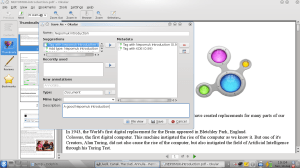
Okular and Smartsave

Okular and Smartsave

Since last monday, the 2009 edition of the Summer of Code is over, so it’s time for a summary of the work of my project, what has been done, what has not been done, and what I am doing right now; while reading this, keep in mind the picture you see above, taken from one of the most recent code snapshots of the smartsave dialog system.

The project: a little reminder

My project for the GSoC had the aim of developing an alternative semantic load an save dialog system, through which the user would be able to save meta-informations and interrelations about its files, like associating the current context or the current project, or the pdf version of an OpenDocument file; during the opening operation, a new view of the file system would be produced, so the user should navigate and filter through the previously created metadata, narrowing the possible range of files until it finds out what he/she is looking for.

Why is this important/useful?

This is a question that I often hear, especially from those people who think that a semantic desktop engine is not different from, for example, Google Desktop Search, or similar file crawlers; well, a semantic engine is very different from a crawler: the latter just passively crawls through tons of files, extracting text and allowing a search through keywords, while the former can combine its informations, using mathematical logic rules in a process called reasoning, for expanding the metadata associated to a document and allowing a user to search it through paths he/she hadn’t thought about when saving it.

The semantic desktop is not just this, and a very good introduction to it can be found here: it is worth reading it, believe me.

The new dialog system jumps straight into this view: saving files in the current way is somehow old, and it requires the user to create a reasonable directory path, so he/she will be able to find its file back someday, when he/she will need it; in my view, it should be very useful if we are able to associate to a document some informations, about its contents or about the contest in which we have created it, without bothering with a file system structure: wouldn’t it be easier to search for it later?

What has been done in these three months

Ok, so what do we have now? During this GSoC, I have created a new UI, similar in certain aspects but different in others to the current one; an interface to some plugins which are able to analyze file content and extract possible metadata, also querying some online services like OpenCalais; the user is also able to associate personalized metadata.

The open dialog presents a full list of files, comprehensive of those indexed by Strigi, with a list of filters for narrowing the search; the filter system is very similar to the faceted browsing system which you can find on many Web sites.

Currently, files are saved in ~/Nepomuk, with a file path that can be explored also through the standard file manager; the name and the path automatically given by the dialog backend is not *that* beautiful for now, but there are some development already planned.

What has not been done

Reading from the original application, there is just the optional goal which has not been developed, and it consisted in a new view also for the file manager, allowing a file browsing similar to the open dialog one; unfortunately, time has not been enough to develop it too, but other developers are also working on a better file search UI for Dolphin, so there will surely be news in this field in the next weeks.

What is developed now (and where is the code)

The code for this dialog system is in playground, in the Nepomuk-KDE section, but currently it cannot be used as is 🙂

But there is a good reason for this: I am currently working in a little hack of kdelibs, for having the dialog shown as an alternative in all the KDE programs (like Okular in the screenshot, or KOffice in a previous post), so the code is now in an intermediate form and you will have to wait a little more to try it out.

This is currently the main development target, with also a couple of todo items still in my list; there will also be new code coming up for the elaboration of the “real” file path, and more plugins for extracting more and more metadata automatically from the document to be saved.

Wrapping up

Here are some credits: I have to thank Nicola Vitucci, a great friend who gave me some very good advices, especially when I wrote my application; Sebastian Trueg, my mentor, for having helped me along these months (and for still helping me 😀 ), and for having stood for my very basic questions on Qt and KDE libraries; Adam Kidder and its GSoC project about kio-slaves, which I am heavily using in the open dialog, and all those people who commented my posts and discussed their views in chat with me: your opinions and ideas has been very important, and I hope they will be of the same importance also in the next days that I will spend with KDE and its community (yes: I’m staying with you)!

So, stay tuned: some good things are coming out!

Read Full Post »

KWord 2.0.2 and Smartsave

KWord 2.0.2 and Smartsave

As we are approaching the end of GSoC, little surprises along the way… more of this in the next entry, the next week, when the deadline will be passed.

Read Full Post »

« Newer Posts - Older Posts »