Feeds:
Posts
Comments
System UML 1

System UML 1

And here we go with another image!

Ok, as an instrument for making everything a little more clear, I made a class diagram (yes, UML…), which shows a high level view of how the dialog system may show up in a few weeks.

Now, I use UML in the Fowler’s way, so the final system may look completely different from this one, or the diagram may change accordingly, mainly because of two things:

  • this is not completely integrated with the Qt/KDE dialog classes, essentially because I’d like to have some backend system working before planning that part deep;
  • the SuggestionProvider and the integration with the Annotation Plugin already present in playground is still a work in progress: in particular, I still think that giving an abstract class to be subclassed by KDE developers is better than a pure function to be called, but anyway I may change my idea on that, we’ll see.

So, expect something to come up (soon?) under playground/base/nepomuk-kde/smartsave (nice name, uh?), waiting for the official GSoC start in 9 days…

Synesis 2009

Io: … bè, siamo un’associazione studentesca che si occupa di diffondere presso gli studenti il software libero…

Lei: Ah, anch’io ho la mail su Libero!

Il titolo è un po’ pretenzioso, ma in realtà è una semplice scusa per unire due argomenti di cui volevo scrivere: netbook e Star Trek.

Iniziamo dal secondo: ieri sera sono andato a vedere il Film (notice the upper case F), e tutto ciò che posso dire è: spettacolare! JJ potrebbe essere riuscito nell’intento di attirare nuove leve fra i Trekkers, e non credo abbia scontentato troppo i “vecchi” fan.

Perle come il capitano Pike, piuttosto che il test della Kobayashi Maru, sono perle che portano ricordi ben chiari e che non possono che far sentire un fan a casa; volendo l’unica mezza cavolata è (spoiler!!!) Spock che bacia Uhura… cosa che lascia un poco interdetti, anche se si può pensare che, in giovinezza, Spock non avesse ancora il pieno controllo delle emozioni che sfoggia più avanti.

Insomma, voto assolutamente più che buono, grafica stupenda (IL&M sa il fatto suo) e storia non male, anche se in effetti le motivazioni del cattivo sono un po’ scarse, e forse è effettivamente il personaggio più debole del film.

Netbook, questo sconosciuto. Ebbene sì, si sta avvicinando il momento dell’acquisto del nuovo portatile, e ieri vagavo liberamente sul sito della Dell: sto seriamente prendendo in considerazione (di nuovo?) l’idea di prendere, oltre al portatile serio, anche un netbook, in particolare il Mini 9 versione 16 GB SSD.

Devo ammettere che, sei mesi fa, pensavo ai netbook come ad una cosa utile, ma non utile a me (almeno nell’immediato), tant’è che ho preso l’eeebox; oggi, tuttavia, con i mille progetti in ballo, la necessità di vedere le mail anche quando sono in giro, piuttosto che avere meeting online o organizzare demo/lezioni per il POuL, ebbene avere un PC di 1 kg sempre nello zaino, con 4/5 ore di batteria, sfoderabile in pochi secondi, mi attira molto.

Certo, mia madre direbbe l’ennesimo doppione, ma non sarebbe assolutamente così: mi sto abituando bene a girare con il 12″ che ho ora, ma quando torneremo ai beneamati 3 kg del portatile da 15,4″ (o addirittura 16″, se prendo l’XPS), di certo non lo porterei in giro allo stesso modo, e tornerebbe ad essere il semifisso di appartamento, pronto a venire con me in caso di necessità e nulla più.

Il netbook, invece, sarebbe sempre pronto per un giro su Internet, un ritocco a questo o quel progetto (tanto ormai è tutto su SVN/BZR/GIT/whatever), un meeting online, una richiesta dal lavoro o dall’associazione, e tutto sarebbe fatto in pochi secondi.

Insomma, un acquisto da considerare assolutamente (magari calando un po’ i requisiti del portatile serio, magari scendendo dai 1200 € della personalizzazione di ieri a un migliaio…).

Corsi Linux 2009

Corsi Linux 2009

Corsi Linux 2009

Cominciano mercoledì prossimo, 13/05, i corsi su GNU/Linux, organizzati dall’associazione POuL; il programma è ricco, dettagliato e soprattutto “hands on”, e verranno mostrati alcuni dei programmi più famosi e/o più utilizzati in campo office, multimedia, sicurezza, internet.

Nella lezione del 13, inoltre, il sottoscritto terrà una (piccola) introduzione sul mondo multimediale: riproduttori audio/video ed un po’ di editing musicale (cui seguirà un articolo sul prossimo numero del Giornalinux).

Mi raccomando, partecipate numerosi: non ci sono limiti di posto o di presenza!

DISCLAIMER: these images are here just to show you which blocks will be present in the end, they will not be used as they are. They are a proof of concept.

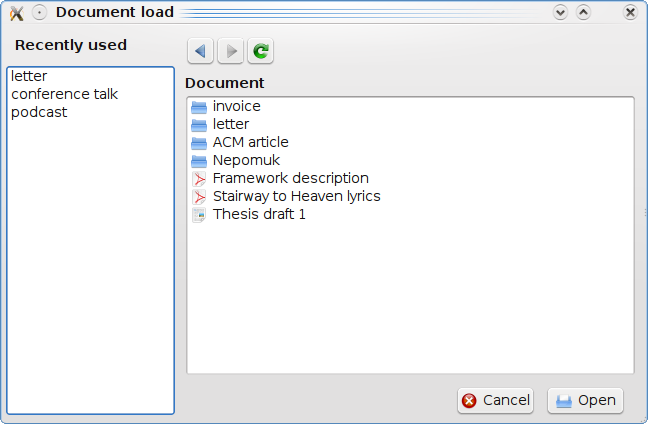
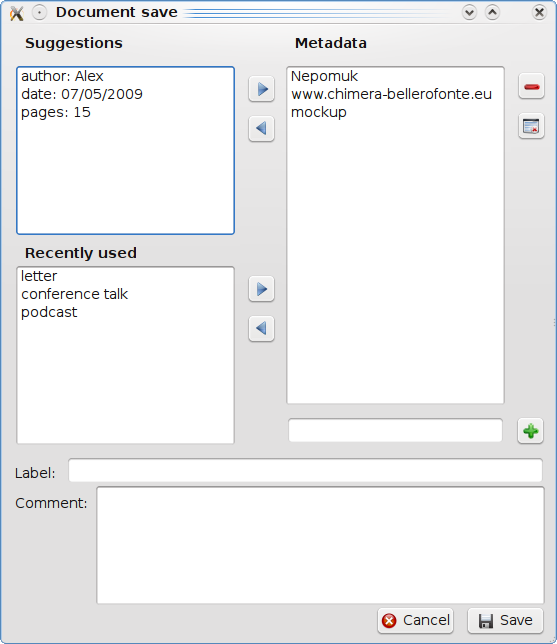
As promised, here are a couple of drafts (have you noticed the bold font?) for the future UI: they are not meant to be the definitive interface, they are here only to show what widgets/views will (probably) be in the final dialogs.

Load dialog

Load dialog

The load dialog is very similar to the actual load dialog: instead of folders, the central view will show metadata (here represented with the “folder” icon) and files associated with the tags already selected (and written in the breadcrumbs). When you will “enter” a metadata, view and breadcrumbs will be changed accordingly.

On the left there is a panel showing the recently used tags, so you will be able to use them as shortcuts.

Save dialog

Save dialog

Ok, the save dialog will probably be completely different: on the right, there will be a view with the list of metadata that the user has chosen to associated to the current file; on the left, a view will show the recently used tags (as before), and another view will collect suggestions given by the program (and the program itself will provide them, using some internal logic).

At the bottom, the label of the document (or resource, as called in semantic terminology), which will be the final filename (even if it will be completely trasparent to the user), and a space for a comment to the file, maybe automatically filled by the program, as before.

So, that’s it! You can see some changes in respect to the actual system, probably the saving system will be the main change.

Stay tuned, as I am studying how to realize the internals of the project, so soon there will be some ideas (or even diagrams!)…

Nick

Così “dovrebbe” diventerà “farà”.

Mondo latte!

Ok, dopo essere finito dritto dritto su PlanetKDE, ora sono citato anche da Pollycoke! Non sto più nella pelle… 😀

Per i miei 5 lettori: i post in inglese finiscono nel reader di PlanetKDE (oltre che in quello del mio mentore), da lì l’uso dell’inglese…

Hello Planet!

Ok, after a few years spent reading this blog aggregator, it is now a honor to be a part of it; so: hello planet!

I am Alessandro, and I will develop a new save and load dialog/browsing system which will work with metadata, using Nepomuk, for Google Summer of Code 2009.

It has been a while since I was looking for an interesting way of collaborating with KDE, and now this opportunity it is going to be really great! I really believe in the potentials of semantic desktop (as well as semantic Web, but this is another story), KDE is pioneering in this field and I am very happy to give my contribution to it.

I am now working on some mockups, especially of the new dialogs UI, so stay tuned and soon I will be able to publish a few things out…

In the meantime, you can find my original proposal details here.

Ok, now it’s time to explain a little more in detail my proposal, so you don’t have to read the whole PDF attached a couple of posts below.

KDE has, since the 4.0 version, a semantic layer/engine called Nepomuk (that you may well know), and the project aims to create a new file dialog, which will allow users to save files associating any type of metadata, suggested by the program, as email details from KMail, document data from Okular, related people or projects, or anything that the user can add autonomously.

When the user will open files, he will browse through tags, until he will find what he will be looking for. In the next days I will be working on a little mockup, for showing what I am thinking about: an idea could be adding an input like the WordPress one, or something like a tag cloud for the system suggestions… anyway, expect some pictures soon!

Polinux 2.0

Dopo settimane di intenso sviluppo, e dopo un pomeriggio passato a bestemmiare ad aggiornare al volo tutti i pacchetti, così da essere perfettamente sincronizzati con l’uscita della nuova Ubuntu, abbiamo pubblicato Polinux 2.0!

Particolarmente eccitanti il fatto che i pacchetti siano in hosting presso Launchpad.net (abbiamo il nostro PPA!), e la possibilità di installare polinux-desktop direttamente dal DVD, che contiene tutti i pacchetti necessari direttamente da APTonCD.

Domani inoltre ci sarà l’install fest di Jaunty e Polinux, ed il tutto confluirà gioiosamente dentro i corsi del mese prossimo… insomma, aggiornate aggiornate aggiornate!*

* e magari aspettate un paio di giorni, visto che i mirror di Ubuntu sono affossati oggi 😀