Feeds:
Posts
Comments

Archive for the ‘Virtual world’ Category

Oggi, finalmente, sono riuscito a reinstallare il buon Remuco, nella nuova e scintillante versione 0.9, che finalmente supporta Amarok 2.x.

Per chi non lo conoscesse, Remuco è un pratico software client/server che permette di gestire via cellulare tutti i più diffusi software audio(/video) per Linux; il server è scritto in Python, mentre il client in J2ME: una volta installato ed avviato il primo, ed il relativo software da controllare, è possibile installare ed avviare il secondo sul proprio telefonino, effettuare il pairing via bluetooth (o a scelta connettersi via Wifi, se supportato da entrambi i device) e quindi avere sotto le proprie dita tutti i tipici controlli di riproduzione e di volume, nonchè la possibilità di muoversi nella playlist.

Esclusa la parte server, che è piuttosto semplice da installare una volta scaricato il pacchetto dal sito indicato, l’unica difficoltà è quella di adattare le proprietà di compilazione del client in base al proprio cellulare: dopo un po’ di tentativi, ad esempio, io ho dovuto ridurre il numero dei temi inclusi, ed al contempo limitare la dimensione delle icone a 12 pixel; solo così facendo, finalmente il telefono ha iniziato a riconoscere il programma ed avviarlo correttamente…

Read Full Post »

If you don’t mind, I would like to leave for a moment the devlopment behind, and ask a question: what do you think about netbooks and development?

I mean, I would like to buy a netbook, and I’ve already found and affordable one, and I’m going to buy it for carrying it around at the university and in conferences, so I can access the Web, chats and things like that with a light instrument; what I’m asking is: for your experience, how is using a netbook in events like hackmeetings or development meetings, for example like the “KDE projectname sprint” ones?

I have already experienced programming on an Atom (I have an eeebox at home, and I had to use it for a couple of weeks while waiting for my new notebook), and of course I had been able to develop some code without much fuss, yes I had to wait some time while recompiling code, but not that much in the end, so is it worth bringing a netbook to that kind of meeting?

The positive aspect is that a netbook is light in dimensions and weight, and I can survive on a 10″ screen for a few days (I had a friend who survived on a 7″ screen for a year!), and I can bring it with me every time (I don’t want to leave a computer in a hotel room, for example…).

Please, comment and tell your opinion! 🙂

Read Full Post »

Dopo il wrap up del Google Summer of Code, ora anche il mio mentore, Sebastian Trueg, ha scritto sui risultati raggiunti finora, ed il lavoraccio degli ultimi 10 giorni ha permesso di arrivare a quanto potete vedere negli screenshots pubblicati finora; c’è ancora da lavorarci, ma già adesso una prima preview (potremmo definirla un’alpha release?) è già usabile.

Sebastian ha pubblicato anche la guida per la compilazione, che vi riporto anche qui:

  1. c’è prima di tutto da applicare una patch alle kdelibs, che speriamo venga integrata per KDE 4.4 ma compatibile anche con la versione 4.3;
  2. poi basta scaricare il modulo di Nepomuk in playground e compilarlo: potete installare tutto oppure compilare ed installare i soli sottomoduli scribo, nepomukutils, annotation e smartsave; consiglio anch’io comunque di installare tutto;
  3. infine è necessario modificare i kdeglobals inserendo una nuova voce, file module=smartfilemodule, nella sezione dedicata a KFileDialog ed alle sue impostazioni.

Ho comunque le migliori intenzioni di preparare sia una versione modificata delle kdelibs 4.3 per Ubuntu, con la patch già applicata, ed un pacchetto contenente il modulo aggiuntivo; tenete d’occhio il mio account su Launchpad per gli aggiornamenti del caso.

Chi l’avrebbe mai detto, ormai 6 anni fa, quando ho installato la mia prima distribuzione Linux (Mandrake) e KDE, che un giorno sarei stato citato dal blog di uno dei maggiori sviluppatori di KDE stesso (l’autore di K3b prima e di Nepomuk ora)… 😀

Read Full Post »

GSoC 2009: wrap up

Since last monday, the 2009 edition of the Summer of Code is over, so it’s time for a summary of the work of my project, what has been done, what has not been done, and what I am doing right now; while reading this, keep in mind the picture you see above, taken from one of the most recent code snapshots of the smartsave dialog system.
The project: a little reminder
My project for the GSoC had the aim of developing an alternative semantic load an save dialog system, through which the user would be able to save meta-informations and interrelations about its files, like associating the current context or the current project, or the pdf version of an OpenDocument file; during the opening operation, a new view of the file system would be produced, so the user should navigate and filter through the previously created metadata, narrowing the possible range of files until it finds out what he/she is looking for.
Why is this important/useful?
This is a question that I often hear, especially from those people who think that a semantic desktop engine is not different from, for example, Google Desktop Search, or similar file crawlers; well, a semantic engine is very different from a crawler: the latter just passively crawls through tons of files, extracting text and allowing a search through keywords, while the former can combine its informations, using mathematical logic rules in a process called reasoning, for expanding the metadata associated to a document and allowing a user to search it through paths he/she hadn’t thought about when saving it.
The semantic desktop is not just this, and a very good introduction to it can be found here: it is worth reading it, believe me.
The new dialog system jumps straight into this view: saving files in the current way is somehow old, and it requires the user to create a reasonable directory path, so he/she will be able to find its file back someday, when he/she will need it; in my view, it should be very useful if we are able to associate to a document some informations, about its contents or about the contest in which we have created it, without bothering with a file system structure: wouldn’t it be easier to search for it later?
What has been done in these three months
Ok, so what do we have now? During this GSoC, I have created a new UI, similar in certain aspects but different in others to the current one; an interface to some plugins which are able to analyze file content and extract possible metadata, also querying some online services like OpenCalais; the user is also able to associate personalized metadata.
The open dialog presents a full list of files, comprehensive of those indexed by Strigi, with a list of filters for narrowing the search; the filter system is very similar to the faceted browsing system which you can find on many Web sites.
Currently, files are saved in ~/Nepomuk, with a file path that can be explored also through the standard file manager; the name and the path automatically given by the dialog backend is not *that* beautiful for now, but there are some development already planned.
What has not been done
Reading from the original application, there is just the optional goal which has not been developed, and it consisted in a new view also for the file manager, allowing a file browsing similar to the open dialog one; unfortunately, time has not been enough to develop it too, but other developers are also working on a better file search UI for Dolphin, so there will surely be news in this field in the next weeks.
What is developed now (and where is the code)
The code for this dialog system is in playground, in the Nepomuk-KDE section, but currently it cannot be used as is 🙂
But there is a good reason for this: I am currently working in a little hack of kdelibs, for having the dialog shown as an alternative in all the KDE programs (like Okular in the screenshot, or KOffice in a previous post), so the code is now in an intermediate form and you will have to wait a little more to try it out.
This is currently the main development target, with also a couple of todo items still in my list; there will also be new code coming up for the elaboration of the “real” file path, and more plugins for extracting more and more metadata automatically from the document to be saved.
Wrapping up
Here are some credits: I have to thank Nicola Vitucci, a great friend who gave me some very good advices, especially when I wrote my application; Sebastian Trueg, my mentor, for having helped me along these months (and for still helping me 😀 ), and for having stood for my very basic questions on Qt and KDE libraries; Adam Kidder and its GSoC project about kio-slaves, which I am heavily using in the open dialog, and all those people who commented my posts and discussed their views in chat with me: your opinions and ideas has been very important, and I hope they will be of the same importance also in the next days that I will spend with KDE and its community (yes: I’m staying with you)!
So, stay tuned: some good things are coming out!
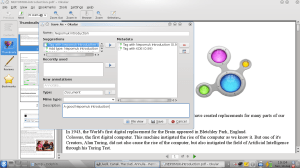
Okular and Smartsave

Okular and Smartsave

Since last monday, the 2009 edition of the Summer of Code is over, so it’s time for a summary of the work of my project, what has been done, what has not been done, and what I am doing right now; while reading this, keep in mind the picture you see above, taken from one of the most recent code snapshots of the smartsave dialog system.

The project: a little reminder

My project for the GSoC had the aim of developing an alternative semantic load an save dialog system, through which the user would be able to save meta-informations and interrelations about its files, like associating the current context or the current project, or the pdf version of an OpenDocument file; during the opening operation, a new view of the file system would be produced, so the user should navigate and filter through the previously created metadata, narrowing the possible range of files until it finds out what he/she is looking for.

Why is this important/useful?

This is a question that I often hear, especially from those people who think that a semantic desktop engine is not different from, for example, Google Desktop Search, or similar file crawlers; well, a semantic engine is very different from a crawler: the latter just passively crawls through tons of files, extracting text and allowing a search through keywords, while the former can combine its informations, using mathematical logic rules in a process called reasoning, for expanding the metadata associated to a document and allowing a user to search it through paths he/she hadn’t thought about when saving it.

The semantic desktop is not just this, and a very good introduction to it can be found here: it is worth reading it, believe me.

The new dialog system jumps straight into this view: saving files in the current way is somehow old, and it requires the user to create a reasonable directory path, so he/she will be able to find its file back someday, when he/she will need it; in my view, it should be very useful if we are able to associate to a document some informations, about its contents or about the contest in which we have created it, without bothering with a file system structure: wouldn’t it be easier to search for it later?

What has been done in these three months

Ok, so what do we have now? During this GSoC, I have created a new UI, similar in certain aspects but different in others to the current one; an interface to some plugins which are able to analyze file content and extract possible metadata, also querying some online services like OpenCalais; the user is also able to associate personalized metadata.

The open dialog presents a full list of files, comprehensive of those indexed by Strigi, with a list of filters for narrowing the search; the filter system is very similar to the faceted browsing system which you can find on many Web sites.

Currently, files are saved in ~/Nepomuk, with a file path that can be explored also through the standard file manager; the name and the path automatically given by the dialog backend is not *that* beautiful for now, but there are some development already planned.

What has not been done

Reading from the original application, there is just the optional goal which has not been developed, and it consisted in a new view also for the file manager, allowing a file browsing similar to the open dialog one; unfortunately, time has not been enough to develop it too, but other developers are also working on a better file search UI for Dolphin, so there will surely be news in this field in the next weeks.

What is developed now (and where is the code)

The code for this dialog system is in playground, in the Nepomuk-KDE section, but currently it cannot be used as is 🙂

But there is a good reason for this: I am currently working in a little hack of kdelibs, for having the dialog shown as an alternative in all the KDE programs (like Okular in the screenshot, or KOffice in a previous post), so the code is now in an intermediate form and you will have to wait a little more to try it out.

This is currently the main development target, with also a couple of todo items still in my list; there will also be new code coming up for the elaboration of the “real” file path, and more plugins for extracting more and more metadata automatically from the document to be saved.

Wrapping up

Here are some credits: I have to thank Nicola Vitucci, a great friend who gave me some very good advices, especially when I wrote my application; Sebastian Trueg, my mentor, for having helped me along these months (and for still helping me 😀 ), and for having stood for my very basic questions on Qt and KDE libraries; Adam Kidder and its GSoC project about kio-slaves, which I am heavily using in the open dialog, and all those people who commented my posts and discussed their views in chat with me: your opinions and ideas has been very important, and I hope they will be of the same importance also in the next days that I will spend with KDE and its community (yes: I’m staying with you)!

So, stay tuned: some good things are coming out!

Read Full Post »

KWord 2.0.2 and Smartsave

KWord 2.0.2 and Smartsave

As we are approaching the end of GSoC, little surprises along the way… more of this in the next entry, the next week, when the deadline will be passed.

Read Full Post »

Disclaimer: the following guide may overwrite some of the files installed through the standard packages of your distribution, so it may be better if the work is done on a newly installed machine different from your production one, or in a different directory along with kdesupport, kdelibs and kdebase from SVN trunk. You have been warned…

As promised, while I’m currently tweaking a few things out in the dialogs, here there are the compilation instructions for trying my code. No .deb precompiled packages (yet?), a couple of passages were a little more complicated in relation to the time that I can give them, so you need to get a little dirty, but I’m sure that this is not a problem.

As a premise, I assume you are a little confident with compiling sources, and you know what cmake is; given that, here we go!

The following passages work for sure in Ubuntu Jaunty, updated to KDE 4.3 (oh, by the way: you need KDE 4.3 or better (that is: trunk) for all this to work), and I know this because my new shining laptop arrived last wednsday, so I did this to work on my code.

Prerequisites

You need at least kdelibs and kdebase packages (let me repeat: minimum version is 4.3, so if you are on Jaunty, you do need the backports repository and the upgrade operation, please refer to www.kubuntu.org for instructions), plus their development versions: kdelibs5-dev and kdebase-workspace-dev (pay attention: kdebase-dev is from 4.2.2); for any other missing library, cmake will tell you what you need.

Source code

Premise: if you don’t have the latest version of Strigi, you need to get it from SVN, too: for example, in Jaunty is 0.6.4 and in Karmic, at least a couple of days ago, was 0.6.5, but you need at least 0.6.95. So, if you need it, then get it:

svn co svn://anonsvn.kde.org/home/kde/trunk/kdesupport/strigi
cd strigi
mkdir build
cd build
cmake ..
make
(as root) make install

You can install it in /usr/local, but this thing is probably going to stop your strigi filesystem analysis: if you don’t care about it, then go and compile it; otherwise, I think you will need to install trunk in some different directory and work with it.

Then, you need to checkout from SVN Adam’s kioslave:

svn co svn://anonsvn.kde.org/home/kde/branches/work/soc-virtualfolders
cd soc-virtualfolders
mkdir build
cd build
cmake -DCMAKE_INSTALL_PREFIX=/usr ..
make
(as root) make install

As you may notice, you need to install that code in the same folder you have KDE, unfortunately it does not seem to work in /usr/local or similar folders (but any suggestion in this sense is accepted): as a consequence, it will overwrite the current kioslave from your packages. Again, if you don’t like it, then compile trunk in a directory different from the one of your standard installation.

After the last command, everything should work.

Now, let’s go with playground:

svn co svn://anonsvn.kde.org/home/kde/trunk/playground/base/nepomuk-kde
cd nepomuk-kde
mkdir build
cd build
cmake ..

Ok, now you have your building makefiles ready; usually I only compile what I really need from this code, also because there is the need to install the annotation plugins, because they are searched at runtime by the dialog system, so here it is the sequence of commands to compile and install them and their dependencies:

cd kcompleter
make
make install
cd ../pimo
make
make install
cd ../nepomukcompletion
make
make install
cd ../scribo
make
make install
cd ../annotationplugins
make
make install
cd ..

Ok, with this you should have installed everything you need (of course, if needed, install commands have to be launched as root); now we can build smartsave and test it:

cd smartsave
make
make install

The installation passage is optional, because it will not install the testing application.

If you want to try the dialog, enter the test directory and launch the texteditor app: it is just the same simple notepad from Techbase tutorials, but with my open and save dialogs instead of the standard KDE ones.

Troubleshooting

Some things can go wrong: the first one is that you see the standard dialogs in the test app, and if this happens, then you probably have shut down Nepomuk, please restart it from the system settings dialog.

The second one is that you don’t get any suggestion in the save suggestion box: if this is true, then you can try by restarting the kde daemon, by invoking kdeinit4 from a console, so that the plugins installed before are registered.

The third one is that you cannot see any file in the open dialog: if this happens, then you have to check that the kioslave has been correctly installed in your KDE main directory (/usr on a standard system, or something else if you work directly on trunk).

What now?

Now that you have a text editor with the dialogs, what can you do? Well, I’m going to prepare a screencast, probably in the following week, to show a couple of features; bear in mind that there are some tweaks on which I’m working on, so this is not a perfect system or a system ready to be shipped in a stable release (far from that 🙂 ), so be patient and test, and feel free to report any kind of trouble you may find along the way.

GSoC status

Well, one week left: the dialog system surely has a base on which to work for both UI and some backend code; there are a couple of things that I’d like to work out before August the 17th; then I may try to add these dialogs to a real KDE application, instead of a simple test program, but we will see what will come up in the next few days…

Read Full Post »

64 bit!

Dell Studio 15 foto 1

Dell Studio 15 foto 1

Dell Studio 15 foto 2

Dell Studio 15 foto 2

Eccolo! Il nuovo portatile è arrivato mercoledì, e lo potete ammirare in tutto lo splendore della cover verde lime…

La seconda foto non rende giustizia alle dimensioni dello schermo, non so se siano i 15,6″ o solo un’impressione, ma pare più allungato rispetto al vecchio notebook; se la viaggia discretamente, anche se la batteria sporge un po’ non ci si fa molto caso, sembra anche più leggero. La tastiera, tra l’altro, è spettacolare (e sicuramente meglio di quella dell’eeebox), silenziosa e larga, mi manca solo un mouse in tinta ormai!

Come OS, ovviamente Vista ci ha lasciati senza manco fare il primo boot di configurazione, ed al suo posto una scintillante Ubuntu Jaunty, con ieri upgrade a Kubuntu (mi serve KDE per il GSoC, as you may know) e litri di software installato; ho anche copiato tutti i dati, e fa un certo effetto leggere 30 GB occupati di home ma solo l’11% dello spazio disponibile!

Come compatibilità hardware, va pressochè tutto: la scheda ATI necessita dei driver proprietari, anche perchè altrimenti scalda un sacco e non va il 3D, ma installati quelli (dalla pratica voce dei menu di Ubuntu) tutto ok; anche la scheda wireless Intel funziona, dopo un momento iniziale in cui non vedeva nessuna rete (difatti ieri cavo 10 metri per attaccarmi al modem), da ieri sera pare essersi ripigliata (naturalmente senza che io facessi alcunchè). Giusto un’opzione da mettere in modprobe per far funzionare anche la scheda audio, e tutto va bene.

Non testati (yet): il mousepad a fondo: per andare va ma finora ho sempre usato quello esterno; la batteria: il primo giorno sono andato a corrente, anche perchè ci sono da fare le 12 ore di carica iniziali, sono in batteria da un po’, almeno un’ora e mezza, forse anche due, e sono più o meno a metà, quindi parrebbe già non male; devo capire un attimo come far calare ulteriormente la luminosità anche coi driver proprietari…

La webcam ed il microfono integrato: li ho visti, ma non li ho ancora toccati, idem per il bluetooth (che dovrebbe essere integrato, AFAIK).

E, naturalmente, si viaggia a 64 bit!

Read Full Post »

KDE 4.3 codename Caizen

KDE 4.3 codename "Caizen"

Read Full Post »

Open dialog v.1

Open dialog v.1

Yes, as you can see, now the open dialog is working!

It took more time than expected, especially because of a couple of different approaches tried along the way (and some signal loops between models), but now a first basic version is there: as you can see, on the right there is a standard KDirModel, which is using Adam‘s code, the other GSoCer of Nepomuk, on kio-slaves, and it shows files; on the left, there is the filter view.

The filter view is still a work in progress, but it is quite similar to the faceted browsing systems you can see in many Web sites: there are properties and their current value, taken from the files shown on the right side, and the user can check them and restrict those files (and consequently the filters themselves become less in number). Of course, their visualization is very very _very_ basic for now, but it will become better, don’t worry about it!

There have been also a couple of changes in the save dialog, especially in how the user can enter personalized informations, I don’t have a screenshot right here but a screencast will come, I promise, as soon as some things will be refined.

Now, about the roadmap: only three weeks of official GSoC are left (17th is the last day “on the job”), so for that date I need to do a couple of important refinements in the base code, and some good work will go in the UI part, filters as one of the priorities; anyway the base dialog system is there, and that’s the first important thing. So, stay tuned!

P.S.: some people asked about how to try the code: in short, you need to compile the virtualfolders branch and the nepomuk playground, but some things need to be installed to be used, so I will publish some detailed guide, at least as I compile and use it; I also thought about creating some debs and putting them on my account on Launchpad, if I can I will do it and tell you about it: they will be Ubuntu debs, because I use that distribution 🙂

Read Full Post »

Ho pensato per un po’ se far uscire questo post anche su PlanetKDE, però poi ho optato per l’italiano e per la stretta cerchia di lettori “nostrani”, ed è perciò a questo pubblico che rivolgo i miei 2 cents sul dibattito Mono.

Premessa doverosa: non intendo soffermarmi sulla questione etica, che è stata sicuramente mitigata dagli ultimi accordi di licenza by Microsoft, e che comunque non mi trova del tutto d’accordo con RMS (che, ripeto, per me continua ad essere troppo estremista, il mondo non è bianco o nero).

Da un punto di vista di sviluppatore, mi infilo alla grande nel dibattito Banshee vs. Rhythmbox, ripreso anche su Pollycoke, forse uno degli eventi maggiormente scatenanti le polemiche: in pratica, Canonical vuole sostituire al secondo il primo nella prossima edizione di Ubuntu, sostanzialmente droppando lo storico riproduttore di Gnome ed aumentando perciò la propria dipendenza da Mono, questo quando altre distribuzioni invece cercano di liberarsene.

Ora, io non sono mai stato un utilizzatore di nessuno dei due, dato che mi piace Amarok e lo uso a prescindere dal Desktop Environment che ho attivo in quel momento; sottolineo che entrambi i programmi hanno due interfacce estremamente simili, quindi un utente dell’uno non credo possa essere completamente spaesato nell’altro, e sono comunque convinto che chi utilizza Rhythmbox continuerà ad usarlo a prescindere da che programma sarà di default, anche perchè si potrà installare quest’ultimo giusto con i soliti due click. Mi è anche difficile sparare su Mono, dato che uso ormai da 3 anni Tomboy, e non lo cambio neppure ora che sono fisso su KDE, più che altro perchè ho ormai più di 300 note, e voglia zero di dover creare uno script apposito che mi trasferisca tutta la history in un altro framework analogo.

Da un punto di vista di sviluppatore, bè non posso che approvare la scelta: sono ormai un paio di mesi che sviluppo in C++ per il GSoC, ed intendiamoci, questa non è certo una critica (o uno sputare nel piatto dove sto mangiando quest’estate), ma rimango comunque alquanto interdetto dal fatto che siamo costretti ancora ad usare C/C++ per produrre non dico programmi dalla grafica 3D spinta, o dalla gestione di dati sconfinati, ma per produrre un’interfaccia grafica standard e funzionalità direi “normali”.

Per un programma di riproduzione multimediale, obiettivamente, uno sviluppatore non può dover trattare ancora con la gestione della memoria, non nel 2009, per il semplice motivo che è assurdo dover stare attenti a dove eseguire i delete o le free per evitare dangling pointers, o utilizzare compilatori sostanzialmente lenti (Banshee lato C# si compila in 2 minuti, serve quasi quasi di più per i wrapper in C verso le librerie multimediali) e che producono errori non certo sempre comprensibili.

Ammetto, ad esempio, che la mia esperienza con C++ non è così vasta, e che giorno dopo giorno imparo dai miei errori ed evito di combinare guai con le mie librerie, certo è che ho perso tre ore per un’istruzione non funzionante in una classe (quando in un’altra classe sostanzialmente identica non dava problemi), per poi scoprire che mancava un’include, e naturalmente l’errore non faceva certo percepire che il problema potesse vagamente essere questo; oppure la possibilità di passare i parametri per riferimento in due modi diversi, che naturalmente devono essere gestiti in modo diverso, o la quantità di combinazioni della parola chiave “const” che si possono utilizzare…

Quando il mio progettino sarà finito, inoltre, dovrò dare un giro di Valgrind, per verificare di non lasciare memoria occupata per niente, quando in linguaggi come Python, Java, C# questa è una cosa assolutamente inutile, dato che non dipende più da me.

Insomma: i framework Qt e GTK sicuramente aiutano e tolgono parte del peso dalle spalle dei programmatori, ma secondo me dovrebbe esserci sempre più la nascita e lo spostamento di sforzo di sviluppo dai linguaggi usati oggi a quelli che potremmo considerare sostanzialmente moderni, dato che il livello di prestazioni è sostanzialmente identico e la manutezione e lo sviluppo discretamente semplificati.

Read Full Post »

« Newer Posts - Older Posts »