Feeds:
Posts
Comments

A few weeks ago I ported the Firmata library to Lua, as a first step of an experiment of a DIY Arduino Yun. For several reasons I had to postpone that experiment (reasons being writing my Ph.D. thesis, and the fact that the Carambola board has the wrong pin distance to do anything good with it), and now I have an Arduino Yun, which essentially is a Carambola done well (and I couldn’t expect less by the Arduino people).

So, the next step is to run my Erlang framework, ELIoT, on it (the fact that the Yun has double the internal flash memory of the Carambola and support for external SD cards is simply great), and to interact with the microcontroller (the usual Atmega 32u4) I needed a porting of Firmata to Erlang. The Yun team gives you a Python library for intercommunication, but since it is not C/C++ I couldn’t make a wrapper to an Erlang driver, so I decided to go (Erlang) native.

Thus, meet the library: as before, it is a simple port of the Java Processing one, meaning that it supports only analog and digital write/read operations, among the other operations of Firmata. I have tested it on the Arduino Yun: the Atmega 32u4 was running the Standard Firmata sketch, and a computer was running Erlang and the library (I still have to install Erlang on the Yun microprocessor itself), and it works, at least with the usual simple test of enabling the integrated LED and read from one of the analog sensors.

The library itself is structured as a gen_server: just one instance each time, of course.

*** UPDATE ***

Now the library works in both push and pull modes: a client can query the server to obtain the current values of sensors, or it can receive the updates directly from the server by subscribing to a specific (analog or digital) pin.

Beware that the latter will generate a new update message for each Firmata update from the Arduino (for example, the StandardFirmata sketch running on my Yun produces about 50 messages per second, one update every 20 ms). You may need to filter these messages, e.g., taking action when a certain threshold between consecutive values is exceeded.

Arduino in a box

Arduino in a box

Un paio di righe per descrivere brevemente un esperimento preparato stamattina con Arduino ed un paio di accessori.

Il problema è il seguente: capita di andare via di casa per diversi giorni (ad esempio a Natale o ad agosto), per vacanza o per altri motivi; al vostro ritorno, potreste domandarvi se è mancata o meno la corrente, e di conseguenza se quanto avevate lasciato in frigorifero o in freezer è ancora commestibile. Nel mio caso, so se è mancata perchè la sveglia del comodino lampeggia, ma non ho idea del tempo in cui sia effettivamente mancata.

Da qui, l’idea di mettere assieme un Arduino, un RTC ed uno shield con SD, per scoprire effettivamente se e per quanto tempo sia mancata la corrente quando non sono in casa. Il codice sotto riportato scrive su un file una riga di timestamp ogni 5 minuti (sfruttando l’interrupt che l’RTC lancia una volta al minuto): se la corrente viene tolta, l’Arduino si spegne e smette di scrivere su file, salvo poi riprendere al ripristino dell’alimentazione, e l’RTC avrà mantenuto nel frattempo l’orario (essendo alimentato a batteria), ed una semplice analisi del contenuto del file permetterà di scoprire l’intervallo di tempo in cui non sono stati scritti timestamp.

Non do rassicurazioni sul codice sotto riportato: test brevi hanno funzionato, ma sto ancora svolgendo un test prolungato nel tempo. L’unica particolarità del codice è che sia l’RTC che la SD comunicano attraverso SPI, utilizzando due modalità diverse (MODE3 vs. MODE0), quindi bisogna alternare le due prima di usare l’uno o l’altro dispositivo. La libreria per RTC serve solamente a semplificare la scrittura nei registri, mentre la libreria Time serve per tradurre una data ed ora in UNIX timestamp.

I collegamenti hardware dell’RTC sono molto semplici e vanno sulle connessioni standard SPI dell’Arduino Uno (CS è 10, dato che lo shield SD ha CS sul pin 8); l’uscita SQW dell’interrupt del DS3234 va al pin 2, che corrisponde ad interrupt zero per l’Arduino Uno.

#include <SPI.h>
#include <ds3234.h>
#include <SD.h>
#include <Time.h>

#define RTC_CS 10
#define SD_CS 8
#define RTC_INT 2
#define MINUTES 5
#define FNAME "logger.txt"

int time_interrupt = MINUTES;
File logger;

void setup()
{
  Serial.begin(115200);
  pinMode(RTC_INT, INPUT);
  pinMode(SD_CS, OUTPUT);
  SPI.setDataMode(SPI_MODE3);
  DS3234_init(RTC_CS, DS3234_INTCN);
  DS3234_clear_a2f(RTC_CS);
  set_next_alarm();
  SPI.setDataMode(SPI_MODE0);
  attachInterrupt(0, INT0_ISR, LOW);
  SD.begin(SD_CS);
  Serial.println("Waiting for first alarm...");
}

void loop()
{
  struct ts t;
  tmElements_t t2;
  time_t time;

  if (time_interrupt == 0) {
    SPI.setDataMode(SPI_MODE3);
    DS3234_get(RTC_CS, &t);
    SPI.setDataMode(SPI_MODE0);
    t2.Second = t.sec;
    t2.Minute = t.min;
    t2.Hour = t.hour;
    t2.Wday = t.wday;
    t2.Day = t.mday;
    t2.Month = t.mon;
    t2.Year = t.year - 1970;
    time = makeTime(t2);
    logger = SD.open(FNAME, FILE_WRITE);
    if (logger) {
      logger.seek(logger.size());
      logger.println(time);
      logger.close();
    }
    time_interrupt = MINUTES;
  }
}

void set_next_alarm(void)
{
  SPI.setDataMode(SPI_MODE3);
  boolean flags[4] = { 1, 1, 1, 0 };
  DS3234_set_a2(RTC_CS, 0, 0, 0, flags);
  DS3234_set_creg(RTC_CS, DS3234_INTCN | DS3234_A2IE);
  SPI.setDataMode(SPI_MODE0);
}

void INT0_ISR(void)
{
  detachInterrupt(0);
  --time_interrupt;
  SPI.setDataMode(SPI_MODE3);
  DS3234_clear_a2f(RTC_CS);
  SPI.setDataMode(SPI_MODE0);
  attachInterrupt(0, INT0_ISR, LOW);
}

Ci soffermammo dietro un albero, sul limite del campo, a guardare. Intento all’opera, Giovanni non ci aveva ancóra veduti.

Egli avanzava pel campo dirittamente, con una lentezza misurata. Gli copriva il capo una berretta di lana verde e nera con due ali che scendevano lungo gli orecchi all’antica foggia frigia. Un sàccolo bianco gli pendeva dal collo per una striscia di cuoio, scendendogli davanti alla cintura pieno di grano. Con la manca egli teneva aperto il sàccolo, con la destra prendeva la semenza e la spargeva. Il suo gesto era largo, gagliardo e sapiente, moderato da un ritmo eguale. Il grano involandosi dal pugno brillava talvolta nell’aria come faville d’oro, e cadeva su le porche umide egualmente ripartito. Il seminatore avanzava con lentezza, affondando i piedi nudi nella terra cedevole, levando il capo nella santità della luce. Il suo gesto era largo, gagliardo e sapiente; tutta la sua persona era semplice, sacra e grandiosa.

Camminavamo in silenzio, pensosi. Il sole inclinava all’orizzonte, lento. Una polvere d’oro impalpabile fluttuava nell’aria quieta sul nostro capo. La terra umida aveva un color bruno vivace, un aspetto di possanza tranquilla, quasi direi una pacata consapevolezza della sua virtù. Dalle glebe saliva un fiato visibile, simile a quello spirante dalle narici dei buoi. Le cose bianche in quella luce mite assumevano una straordinaria bianchezza, una candidezza di neve. Una vacca di lontano, la camicia d’un agricoltore, un telo spaso, le mura d’una cascina risplendevano come in un plenilunio. […] Passavamo per un sentiero alberato; e le foglie cadute stridevano sotto i nostri piedi; e, dove le foglie non erano, il suolo risonava come per cavità sotterranee, cupo.

– Quando ella sarà morta, – soggiunsi – io che farò?

Uno sgomento repentino m’assalse, una specie di pànico; e guardai mio fratello che taceva accigliato, mi guardai d’intorno per la muta desolazione di quell’ora diurna; e mai come in quell’ora sentii il vuoto spaventevole della vita.

thesis-cloud

image

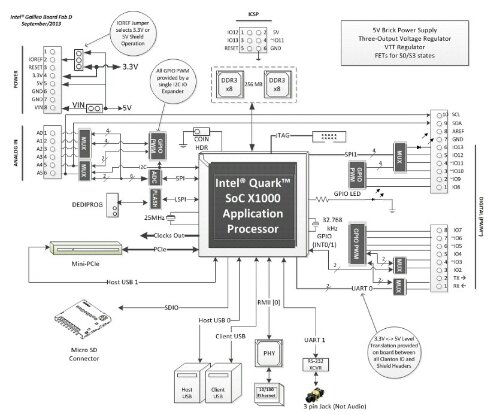
L’immagine qui sopra è tratta dal datasheet che potete trovare sul sito della board; la riporto qui perché trovo sia interessante il fatto che, rispetto a tanta concorrenza (da Arduino Yun a pcDuino), qui l’interfaccia hardware Arduino-compatibile è fornita direttamente dal chip, e non da un microcontrollore a parte.

Da un lato, temo che così si perda la parte real-time che il microcontrollore permette di raggiungere, dall’altro però accedere all’interfaccia hardware (e magari anche all’API software di Arduino) dovrebbe essere possibile senza librerie intermedie (tipo la Bridge per lo Yun). Mi interessa semplicemente per pensare di costruirne un wrapper in altri linguaggi (chessò, Erlang per dire…).

Spero di riuscire ad aprire presto l’immagine Linux che viene fornita con la board, così da capire che librerie ci sono e cosa ci si può linkare (l’architettura è .586).

Intel-based Arduino

Saluti da Roma!

Sto seguendo la MakerFaire edizione europea, organizzata da Riccardo Luna e Massimo Banzi qui al centro congressi dell’EUR. Oggi c’è stata la conferenza d’apertura, decisamente interessante e con un sacco di ospiti che finalmente si sono potuti conoscere di persona (dagli organizzatori, a gente come Dale Dougherty, Bruce Sterling e tanti altri).

image

Inutile dire che il clou della giornata è stato il breve panel con il CEO di Intel, che ha annunciato la volontà dell’azienda di entrare nel mondo dei makers, mondo che avevano (colpevolmente) ignorato finora, e per farlo hanno iniziato una partnership con Arduino ed annunciato (e distribuito ai partecipanti 😀 😀 😀 ) il primo Arduino Intel-based (e dicono di averne un altro paio in canna). Il tutto in pieno spirito open hardware, con quindi tutta la parte elettronica aperta (stanno cercando i canali giusti di distribuzione, dato che quelli che hanno sempre avuto finora trattavano partner industriali e quantità molto grosse; la distribuzione della board inizierà a novembre). Sul lato software, appena provo il tutto scriverò in proposito (no, non so manco le specifiche hardware: oggi sono stato impegnato fino a tardi, ed ora ho l’unico accesso alla WiFi dell’albergo in uso per backup delle foto, appena finisce andrò sul sito a vedere (suspense); posso dirvi che c’è un attacco che non conosco, ed oggi si ventilava l’ipotesi pci-express… E l’alimentatore è da 2 A).

Ora, eccitazione a manetta a parte, e detto che non ho ancora provato nulla (ho solo aperto la scatola e scoperto che tra le altre cose hanno installato un altoparlantino che suona il jingle di Intel quando ribalti la scatola -_- ), propongo la seguente riflessione: da un lato l’arrivo delle grandi aziende è indice secondo me di diverse cose, dal fatto che il movimento dei makers è qui per restare al fatto che Intel potrebbe far saltare il banco in un campo che era preda di altri produttori di hardware, al fatto che Intel, da sempre distributrice di ad es. driver open per PC, promette schematiche altrettanto open.

La mia domanda è: l’ingresso di una realtà così grossa cosa significa per le tante realtà più piccole? I mean, durante il panel si diceva che la collaborazione in oggetto è iniziata 2 mesi fa, ed Intel in quattro e quattr’otto ha messo in campo l’expertise del caso e prodotto una scheda funzionante in fase di distribuzione. Per dire che, se ci sono le competenze, la concorrenza non è banale. Più che altro, mi viene in mente il paragone con la figura della Disney nel romanzo “Makers” di Cory Doctorow…

Charmed S04E21

I was dead before I met you, I was born the day you loved me, and my love for you will keep me alive. Forever.

L’usignuolo cantava. Da prima fu come uno scoppio di giubilo melodioso, un getto di trilli facili che caddero nell’aria con un suono di perle rimbalzanti su per i vetri di un’armonica. Successe una pausa. Un gorgheggio si levò, agilissimo, prolungato straordinariamente come per una prova di forza, per un impeto di baldanza, per una sfida a un rivale sconosciuto. Una seconda pausa. Un tema di tre note, con un sentimento interrogativo, passò per una catena di variazioni leggere, ripetendo la piccola domanda cinque o sei volte, modulato come su un tenue flauto di canne, su una fistula pastorale. Una terza pausa. Il canto divenne elegiaco, si svolse in un tono minore, si addolcì come un sospiro, si affievolì come un gemito, espresse la tristezza di un amante solitario, un desio accorato, un’attesa vana; gittò un richiamo finale, improvviso, acuto come un grido di angoscia; si spense. Un’altra pausa, più grave. Si udì allora un accento nuovo, che non pareva escire dalla stessa gola, tanto era umile, timido, flebile, tanto somigliava al pigolio degli uccelli appena nati, al cinguettio d’una passeretta; poi, con una volubilità mirabile, quell’accento ingenuo si mutò in una progressione di note sempre più rapide che brillarono in volate di trilli, vibrarono in gorgheggi nitidi, si piegarono in passaggi arditissimi, sminuirono, crebbero, attinsero le altezze soprane. Il cantore s’inebriava del suo canto. Con pause così brevi che le note quasi non finivano di spegnersi, effondeva la sua ebrietà in una melodia sempre varia, appassionata e dolce, sommessa e squillante, leggera e grave, e interrotta ora da gemiti fiochi, da implorazioni lamentevoli, ora da improvvisi impeti lirici, da invocazioni supreme. Pareva che anche il giardino ascoltasse, che il cielo s’inchinasse su l’albero melanconico dalla cui cima un poeta, invisibile, versava tali flutti di poesia.

Carambola and Arduino

Carambola and Arduino

The makers world, or at least myself, is waiting for September 10th, when Arduino will start selling a new product, the Arduino Yun: it’s an interesting event, because it’s been a few months since several other (for a lack of a better word) IoT devices producers have started developing and selling similar devices (e.g., pcDuino), combining microcontrollers and microprocessors in a single, embedded board, and I (for one) want to see what the Arduino company has to offer in this field.

The main idea behind these devices is that you can use microcontrollers for some tasks, in particular for interfacing with hardware through GPIO, PWM (which is not often found in microprocessor boards) and others, with a (soft) real time approach, while the microprocessor often includes a WiFi (and Ethernet) chip, and runs an operating system like Linux (or variants such as OpenWRT), thus is more apt to handle network communication with the Internet and online services. I have to admit that at the beginning I thought it didn’t make a lot of sense: if you needed a microcontroller, you could use a microcontroller, and if you needed a microprocessor, you could use one. But then the idea of having both on the same board, with good libraries for data exchange between the two, started to make sense (needless to say, I already have in mind a couple of projects, but no spoilers yet).

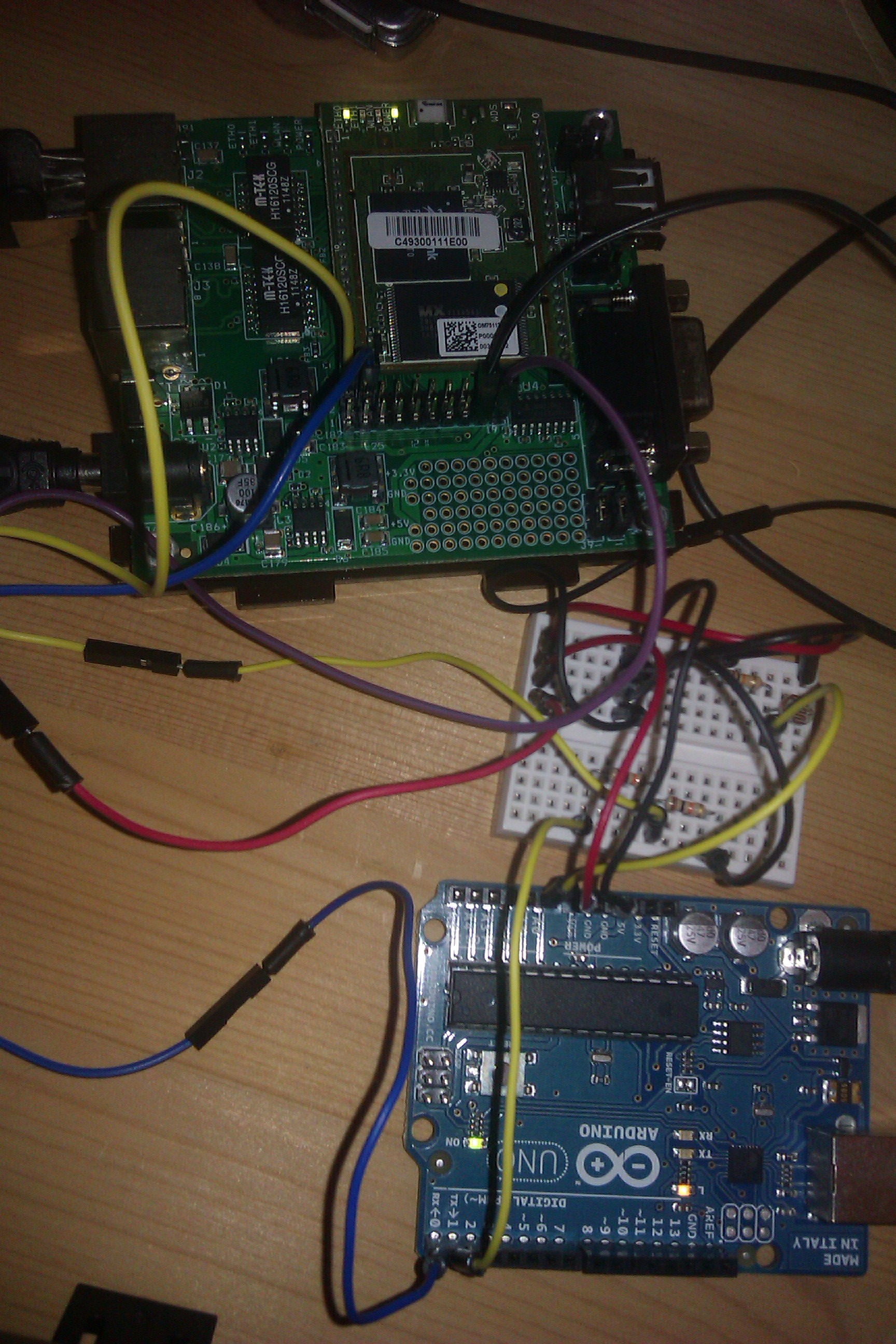
That said, while waiting for September 10th, I tought it could be interesting to make my own “Arduino Yun”, to combine a router-like device running OpenWRT with a microcontroller. What you can see in the photo above is the first step in this direction: hardware connections and software libraries.

The hardware

The OpenWRT board is a Carambola, about which I already wrote several posts in the past couple of years: it is a MIPS board with 32 MB of RAM and 8 (!) MB of Flash disk, plus several I/O pins (but no PWM), two Ethernet ports and a WiFi chip; in the photo it is shown with its dev board (the Carambola itself is the smaller piece with the two leds in the upper part of the photo). The microcontroller board is simply an Arduino Uno (rev2).

The Carambola (with the dev board) is powered by a 12V supply, and in turn it powers the Arduino through the Vin pin; the two communicate through one of the two UART ports of the Carambola, in particular the one “exported” on the pins (ttyS0; ttyS1, the other one, is connected on the dev board to a DE-9 connector). A voltage divider is needed, because the Carambola pins run at 3.3V, while Arduino ones run at 5V, so you cannot connect directly the Tx pin of the Arduino to the Rx pin of the Carambola (while the other direction works: 3.3V is enough for the “high” state of Arduino pins).

The small breadboard also contains a photoresistor, connected to the first analog input of the Arduino, and the reason why it is there will be explained in the next section.

The software

The Arduino people have developed a new library for the Arduino Yun (called “Bridge”), but in my experiment I wanted to use something already existent, so my first thought was Firmata. I used it in the last couple of experiments to interface Arduino with Processing (Java, basically), and I thought I could do the same here.

So, Arduino Uno is running the latest Firmata library (the one distributed with Arduino IDE 1.0.5); at this point, I had to find the corresponding library to run on the Carambola board. Now, on OpenWRT, with only 8 MB of Flash, it is really hard to make space to languages or other not-so-small applications, so the first choice would have been C: I’m pretty sure there is a Firmata library for C/C++ somewhere (I didn’t search for it, but nevertheless…), but I thought it would be less difficult to use other languages (especially because I would like to implement something a little more complicated that the example that I’m showing here).

Now, the language with the smallest footprint I think is Lua (there is also the choice of “Python mini”, but I didn’t try it), so I recompiled OpenWRT with Lua and a serial library that I found on the Internet, and I installed everything. At this point, I only needed a Firmata port to Lua, which didn’t exist (there are a couple of posts on the Web of people saying that they needed it, but no code whatsoever). So I decided to write it down myself (without knowing the language: I met the creator of Lua at the LASER Summer School last year, but I never used it): if non-developers are able to use that language to write scripts for various applications, I should be able to write some hundreds lines of code!

So I ported the Java library (~300 lines of code including comments) to Lua (~200 lines of code), with the help of a couple of libraries for handling bitwise operations and scheduling coroutines (to be able to read and write on a serial port at the same time). I had to go past a couple of “peculiar” characteristics of Lua (e.g., counters in arrays start from 1, or the coroutine scheduling itself was pretty new to me), but everything seems to work correctly now.

The example application simply connects to Arduino (the serial port name may have to be changed depending on your devices), then switches the test led (pin 13) on and off every two seconds, while reading from the analog port values coming from the photoresistor (or any other analog sensor) when switching the led itself (photo below, the peak in the photoresistor values is due to the flash light of the camera). The other coroutine reads periodically from the serial port, if there are bytes waiting to be read. The code may not be the best one written in Lua, but I still don’t know all the peculiarities of the language so I had to improvise from time to time (and take inspiration from the Lua wiki). There is a line that needs to be changed, whether the code is running on a computer or on OpenWRT (because of different implementations of the gettimeofday posix call).

Photoresistor values

Photoresistor values

Limitations

The code works with the configuration described above; I have to admit that I had problems with older Arduino boards (e.g, with the Duemilanove running on ATMEGA 168, Firmata seems not to be working at all, also using Java on the computer side) and with the newest one (an Arduino Uno rev3 SMD, which seemed not to be working with Lua on the Carambola with serial communication through pins, while it worked if connected to the Carambola through USB, so maybe there is a catch with serial pins… I didn’t investigate the problem, I simply used a different Arduino Uno board that I had lying around).

The next steps

The next step is to remove the dev boards: this means remove the dev board from the Carambola and power it directly through its pins (and access it through WiFi with ssh), and take the ATMEGA 328P (the microcontroller from the Arduino Uno) alone (maybe with an external quartz oscillator, not sure about it because I could run it with the internal one, at 8 MHz instead of 16 MHz), program it with Arduino Firmata, and then connect it directly to the Carambola, again through its pins.

Stay tuned!