Perchè nessuno mi dice le cose importanti? I pin analog in dell’Arduino (A0-A5) sono in realtà GPIO, e si possono quindi usare anche come output! Questo cambia parecchio le cose, soprattutto nei circuiti con l’interfaccia ethernet e l’LCD, che da soli portano via 12 pin digitali…
L’evoluzione naturale, dopo aver giocato in lungo ed in largo con l’Arduino, è unire Processing al tutto e vedere cosa emerge… alcune seghe mentali sono già on their way, questo post si limita a mostrare come catturare un video su Linux (ed applicare un effetto real time, già che ci siamo).
Come mai un post dedicato, qualcuno si chiederà… bè, perchè se siete su Linux dovete fare qualche rapida ricerchina per poter catturare video da webcam direttamente da Processing, dato che la libreria di default funziona solo su Mac e Windows (testata peraltro da me su quest’ultimo, e va); per fortuna, qualche anima pia della community ha creato una seconda libreria che sfrutta l’amato (?) GStreamer e ci permette di sfruttare come si deve l’amato sistema operativo.
L’installazione è estremamente semplice, di fatto si tratta di estrarre l’archivio nella cartella libraries (a proposito: lo sapevate che tale cartella si può collocare, in Processing come in Arduino, dentro la cartella degli sketch? Estremamente comoda se condivisa su Dropbox tra computer diversi!), ed il gioco è fatto: tra gli esempi, appaiono ora anche quelli di GSVideo, pronti ad essere provati. Se avete un solo dispositivo video, quello verrà caricato di default, altrimenti dovreste specificare il device.
Se siete su sistemi a 64 bit, c’è da penare un filino: per prima cosa dovete sostituire la directory java dentro Processing con la versione del JDK a 64 bit (il default è solo a 32), o in alternativa fate un symlink alla directory del vostro sistema dove avete già il JDK, e successivamente bisogna sostituire le librerie OpenGL in modes/java/libraries/opengl/library/linux64 con quelle installate nel vostro sistema (per fare questo dovrete installare libjogl per Java (su Debian/Ubuntu c’è l’apposito pacchetto, suppongo ci sia anche sulle altre distro)), con alcuni pratici symlink. Far partire Processing con linux32 non è purtroppo sufficiente…
Riguardo il video: ho messo assieme l’esempio che renderizza la differenza tra due frame successivi con quello che salva il video su file, e mi sono ripreso con la webcam mentre suonavo; il video non contiene audio, dato che il punto era mostrare che GSVideo funziona, non tanto registrare le note suonate; verranno esempi più avanti in cui metterò assieme diverse cose, ora come ora va bene così.
Se siete interessati, il file lo potete trovare qui (l’ho nominato con estensione java, così che Gist lo riconoscesse con la sintassi giusta, ma in realtà è un file pde).
Postilla
Nella registrazione avevo impostato gli fps del file salvato a 25, ma mi sono reso conto che il valore reale si aggirava attorno a 15, ovvero il video finale era accelerato rispetto alla realtà; semmai a qualcuno servisse, ecco il comando per diminuire gli fps usando ffmpeg e yuvfps (con probabile perdita di qualità, ma se volete un lavoro fatto meglio fate qualche esperimento di cattura e verificate che gli fps in output siano corretti direttamente alla fonte, invece che rimediare in un secondo momento…):
ffmpeg -i video.avi -f yuv4mpegpipe - | yuvfps -s 30:1 -r 30:1 |
 ffmpeg -f yuv4mpegpipe -i  - -b 28800k  slow.avi
Ovviamente sostituite al parametro b il valore di qualità in uscita che preferite…
Posted in Virtual world | Tagged informatica, musica, Processing | Leave a Comment »

Ubuntu 11.10
Bè, si potrà dire quel che si vuole, ma di certo non si può non ammettere che Canonical si sta muovendo verso una direzione decisamente interessante… quantomeno nel differenziarsi dalla concorrenza!
Posted in Virtual world | Tagged informatica, linux, Ubuntu | Leave a Comment »
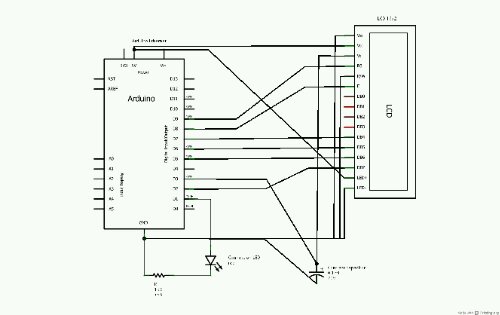
Ecco disegnato lo schema elettrico del circuito di Tweetino: si tratta di fatto dei collegamenti standard per l’LCD, cui si aggiunge l’uso di una uscita PWM per regolare il contrasto (con le variazioni rese più “smooth” da un condensatore) e di un LED che segnala quando il programma sta aggiornando il tweet corrente da internet. Da notare che la scarsità di uscite dovuta alla scheda ethernet sull’Arduino Uno obbliga ad usare anche i pin 0 e 1, e di conseguenza a non poter più usare la connessione seriale nella versione finale del programma.
Appena arriva l’LCD 16×2, metto tutto nella scatola adatta e pubblico le foto finali!
Posted in Virtual world | Tagged Arduino, informatica, Twitter | Leave a Comment »
“[…] How do you find cohabiting with neighbours from whom, after all, you do differ somewhat?”
“I manage.” The witcher looked him straight in the eyes. “I manage because I have to. Because I’ve no other way out. Because I’ve overcome the vanity and pride of being different. I’ve understood that they are a pitiful defence against being different. Because I’ve understood that the sun shines differently when something changes, but I’m not the axis of those changes. The sun shines differently, but it will continue to shine, and jumping at it with a hoe isn’t going to do anything. We’ve got to accept facts, elf. That’s what we’ve got to learn.”
Posted in Citazioni | Tagged Citazioni | Leave a Comment »
I’ve just released the first version of Tweetino, a little sketch for the Arduino which downloads the latest tweets and displays them on an LCD.
The idea is quite simple: the application periodically polls the Twitter servers for getting the latest tweet for the given user, and then the text is shown on a screen; there is already a similar sketch in the new Ethernet libraries for Arduino IDE 1.0, but the difference here is that the connection to the servers uses OAuth, so it is able to get tweets from private accounts (and not just the public ones, like the other implementation cited before).
The code is hosted on Github, as usual, and it has to be filled with several details before being used, in particular it needs the token and access keys that a user can obtain from dev.twitter.com by registering a new application; in particular, the secret keys are to be stored in the EEPROM memory before launching the Tweetino application. Please refer to the README file for more details.
Remarks
First and foremost: I know that a good OAuth implementation should be developed in a separated library, instead of being entangled with the whole program, but the problem is that I’m testing everything on an Arduino Uno, which has just 2 KB of SRAM and OAuth requires some string manipulation, and there is not much space for it; moving everything in an external library requires some work which I have not done (yet), so for now just play around with the current code. Probably an Arduino Mega would help the development (having 8 KB of SRAM), but I don’t have any. Besides, trying to stick everything in just 2 KB has been quite fun.
Second, there is a known bug (sorry!): the Base64 library that I’m using sometimes returns a wrong value (at least with respect to the Erlang code implementation to which I am doing comparisons), and the request is refused by Twitter; given this fact (and the fact that I have no idea, for now, on the cause of the error), I have just added some code to repeat the request a few times in each cycle, in the hope that at least one of the calls behaves correctly. So, don’t expect some real time behavior!
Some images

Tweet in the Web site...
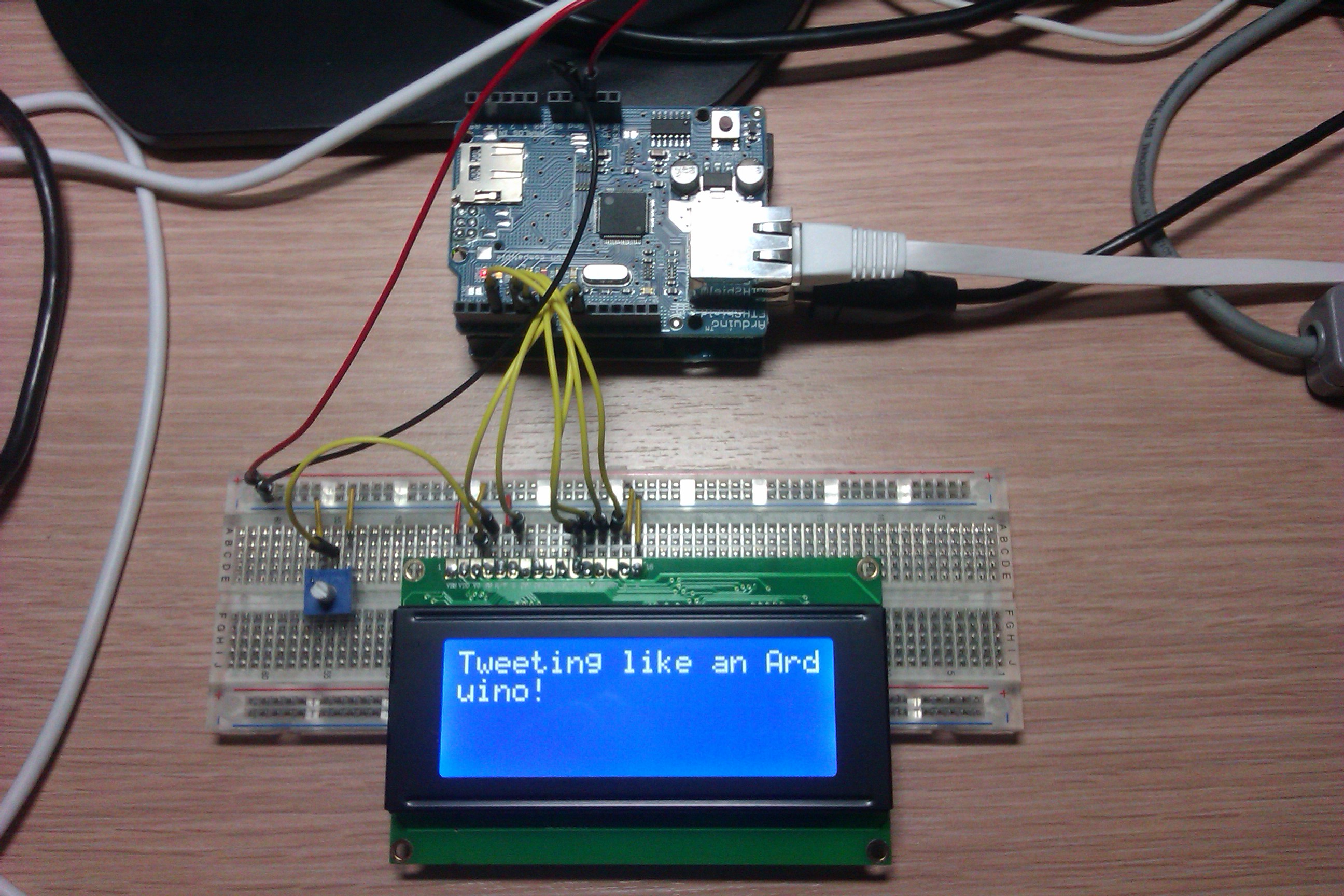
... and straight to Arduino!
Posted in Virtual world | Tagged Arduino, informatica, Twitter | Leave a Comment »
Give me six lines written by the most honorable of men, and I will find an excuse in them to hang him.
Posted in Citazioni | Tagged Citazioni | Leave a Comment »

Dopo aver pubblicato le immagini del Fender Mustang I, new entry dello Studio Siv, è il momento del primo soundcheck: ho impostato il sistema con l’amplificatore “Fender ’57 Deluxe” (settaggi di default), il preset di small chorus ed il tape delay ad una ripetizione, ed ho suonato un po’ di arpeggi casuali, il tema iniziale delle “Tubular bells” ed una versione al volo dell’assolo di “I am the highway”.
La premessa importante è che la registrazione è stata fatta con un microfono posto davanti alla cassa, quindi c’è un po’ di sottofondo, e la parte delle “Tubular bells” non si adatta al ritardo del delay (che avrei dovuto diminuire, mentre era impostato sul tempo della canzone degli Audioslave).
Per il resto, che dire: suono spettacolare (ci ho giocato mezzo weekend), ed ho fortemente rivalutato il chorus; quando ho acquistato il pedale del riverbero, avevo letto su diversi forum che quest’ultimo veniva spesso considerato più importante dell’altro, ma secondo me non è affatto così: il chorus dà un’ampiezza di suono che non esiterei a definire stupenda…
Posted in Real world | Tagged Fender, musica, Studio Siv | Leave a Comment »

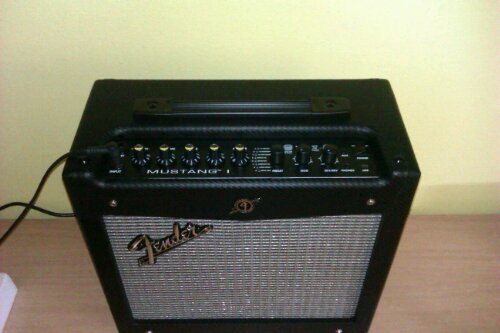
Nuovo amplificatore nello Studio Siv! Naturalmente programmabile via usb…
Maggiori dettagli seguiranno…
Posted in Real world | Tagged chitarra, musica, Studio Siv | Leave a Comment »
The Author
Tag Cloud
amarok Android appartamento Arduino audio Barack Obama basso blog C++ carambola chitarra Citazioni computer corsi Linux eeepc elettronica ELIoT Erlang esami Facebook fantascienza Fender Google gsoc guitar hardware HWProjWeek iCTF ieee immagini informatica Intel Internet Italia Java KDE kde4 Kindle LaTeX laurea lavoro libri linux LinuxDay mandolino Matlab Microsoft Milano musica Nepomuk notebook planetkde polinux Politecnico politica portatile POuL repository Sacco & Vanzetti seggio semantica Sembrowser sito Studio Siv Tesi TV Ubuntu università USA Varie video videogiochi vita web WSNUtilities

 Syvo3
Syvo3 