Feeds:
Posts
Comments

Archive for the ‘Virtual world’ Category

Riusciremmo un giorno a realizzare la vision di TBL?

The entertainment system was belting out the Beatles’ “We Can Work It Out” when the phone rang. When Pete answered, his phone turned the sound down by sending a message to all the other local devices that had a volume control. His sister, Lucy, was on the line from the doctor’s office: “Mom needs to see a specialist and then has to have a series of physical therapy sessions. Biweekly or something. I’m going to have my agent set up the appointments.” Pete immediately agreed to share the chauffeuring. At the doctor’s office, Lucy instructed her Semantic Web agent through her handheld Web browser. The agent promptly retrieved information about Mom’s prescribed treatment from the doctor’s agent, looked up several lists of providers, and checked for the ones in-plan for Mom’s insurance  within a 20-mile radius of her home and with a rating of excellent or very good on trusted rating services. It then began trying to find a match between available appointment times (supplied by the agents of individual providers through their Web sites) and Pete’s and Lucy’s busy schedules. (The emphasized keywords indicate terms whose semantics, or meaning, were defined for the agent through the
Semantic Web.)

In a few minutes the agent presented them with a plan. Pete didn’t like it—University Hospital was all the way across town from Mom’s place, and he’d be driving back in the middle of rush hour. He set his own agent to redo the search with stricter preferences about location and time. Lucy’s agent, having complete trust in Pete’s agent in the context of the present task, automatically assisted by supplying access certificates and shortcuts to the data it had already sorted through.

Almost instantly the new plan was presented: a much closer clinic and earlier times—but there were two warning notes. First, Pete would have to reschedule a couple of his less important appointments. He checked what they were—not a problem. The other was something about the insurance company’s list failing to include this provider under physical therapists: “Service type and insurance plan status securely verified by other means,”the agent reassured him. “(Details?)”

Lucy registered her assent at about the same moment Pete was muttering, “Spare me the details,” and it was all set. (Of course, Pete couldn’t resist the details and later that night had his agent explain how it had found that provider even though it wasn’t on the proper list.)

(dall’articolo The Semantic Web, Scientific American, 2001 (PDF))

Read Full Post »

Ebbene sì: proprio io, il laudator maximo di KDE e Ubuntu, sto per scrivere un rant. E devo ammettere che la cosa è successa un po’ per caso, essenzialmente perchè per la prima volta sto configurando un PC per uso di tutta la casa, quindi essenzialmente multiutente e con un utente in particolare semplificato il più possibile, così da permettere anche ai miei genitori di fare task estremamente semplici (in particolare, navigazione Web).

Pronto e carico, stamattina decido di installare Kubuntu 11.10: avevo già messo su la 11.04 in precedenza in quel PC, ma c’era Gnome e preferivo avere KDE per avere un ambiente desktop che assomigli a Windows e non a Mac, per favorire appunto il newbie della situazione. L’installazione va smooth, come al solito del resto, ma è al momento della configurazione che appaiono i problemi, che mi fanno dire appunto che un sistema del genere non è certo pronto a reggere il confronto con gli altri già nominati. Per la cronaca: il rant è rivolto sia a Kubuntu che a KDE.

Nell’ordine:

  • creo i 3 utenti del sistema: quello dei 3 che verrà usato dai miei vorrei che fosse creato senza password (ovviamente non è amministratore del sistema), dato che non c’è motivo di inserirne una. System settings non si lamenta, e fin qui tutto bene.
  • Tento di fare login con i nuovi utenti: KDM mi costringe a cambiare la password al primo login di tutti, senza che io glielo avessi chiesto. Torno in System settings, ma da nessuna parte trovo l’opzione per disattivare questo comportamento. Prendo atto, riapro la gestione degli utenti, metto password a caso e torno a provare il login. A questo punto inserisco le password definitive, ma sono costretto a darne una anche all’utente che non doveva averne, dato che KDM non accetta campi vuoti. Tanto per fare un esempio, in Gnome posso configurare utenti con e senza password senza alcun problema.
  • Il tema di login predefinito di KDM (e l’unico installato) non mostra i tre utenti, ma costringe a scrivere sia il nome utente che la password. Non c’è modo di cambiare questa cosa, se non installando (forse) un altro tema. Peraltro, se si scaricano ed installano nuovi temi dalla pratica finestrella di System settings, questi non appaiono nell’elenco (forse dopo un riavvio, ma devo controllare).
  • Rekonq è il browser di default di Kubuntu. Rekonq? Ma ci prendiamo per i fondelli? Per carità, se cerchi Firefox trovi l’installer, ma Rekonq è una cavolata fatta più o meno per caso e probabilmente ancora instabile, vogliamo veramente rifilare questo catorcio ai nuovi utenti?
  • KDE notifica con warning, al termine del login di chiunque, che la cartella $HOME/.kde/share/apps/korganizer/contacts (o qualcosa del genere) non esiste. Bè, e allora? Non esiste perchè nessuno di noi usa un gestore dei contatti, non vedo cosa gli possa interessare al sistema se tale cartella non c’è.
  • Imposto un utente con il desktop a vista delle cartelle (aka come un desktop normale), e inserisco alcune icone. Ora, a parte il fatto che le icone hanno dimensioni diverse l’una rispetto all’altra, resta il fatto che se voglio dare all’utente la possibilità di muoverle, devo lasciare sbloccati gli widget, e questo fa sì che ogni volta che si va sopra un’icona esca la barra laterale per spostarla, e se non voglio che appaia questa cosa (che francamente è inguardabile se esce ogni volta che si muove il mouse sul desktop) devo bloccare gli widget, rendendo impossibile muovere le icone. Ora, la barra in trasparenza va benissimo per configurare i plasmoidi e per muoverli, ma per le icone è veramente inutile per non dire pessima da un punto di vista visivo.

Per quanto mi riguarda, uno qualunque di questi punti mi porterebbe quantomeno ad installare Gnome, se non fosse che Unity è troppo diversa dal Windows XP che usano normalmente i miei genitori, e devo ammettere di aver pensato anche di mettere su direttamente XP, se non fosse che è un OS che ha più di 10 anni.

Vedremo le impressioni al loro primo utilizzo, anche se temo vivamente quel momento.

P.S.: il sistema è, come detto, Kubuntu 11.10, aggiornato fino ad oggi con i soli repository ufficiali (quindi nessun PPA in mezzo).

Read Full Post »

The Witcher - Epilogue*

The Witcher - Epilogue*

* Immagine tratta dall’artbook di “The Witcher Enhanced Edition – Director’s Cut”

Read Full Post »

Quasi quasi me la perdo: la trovate qui!

Read Full Post »

After having seen many versions on Internet, I have just created my own theremin using Arduino! Nothing too much fancy, just a couple of sensors and a VST on software side, and that’s it. Here are the details…

Hardware

From a hardware point of view, the circuit is quite simple:  I am using two IR proximity sensors, connected to two analog input pins of the Arduino Uno, plus a couple of leds, which increase their light in proportion to the readings from the sensors, and a couple of pushbuttons, useful for blocking the values sent to the computer (regardless of the readings).

I have also changed the Arduino firmware, as indicated here, using this one, so that the Arduino itself is seen from the computer as a MIDI device, instead of a USB-to-serial port; this has been easy enough: just a 10K resistor is required, soldered in the position indicated on the guide, and then a couple of commands and the new firmware is up and running. Of course, you will need to change it with the standard one quite often in the beginning, before settling the final version of the sketch (which can be uploaded only with the USB-to-serial code). Note that this operation can be done only on an Arduino Uno.

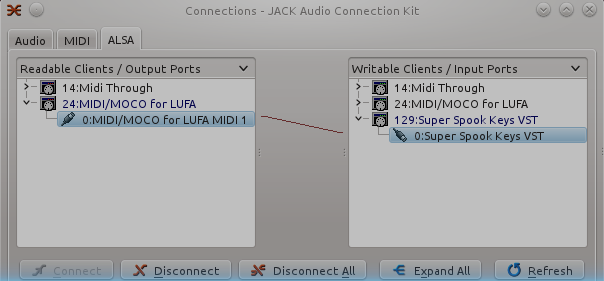
As you can see, the device is correctly shown in QJackCtl:

QJackCtl Alsa view

QJackCtl Alsa view

Software

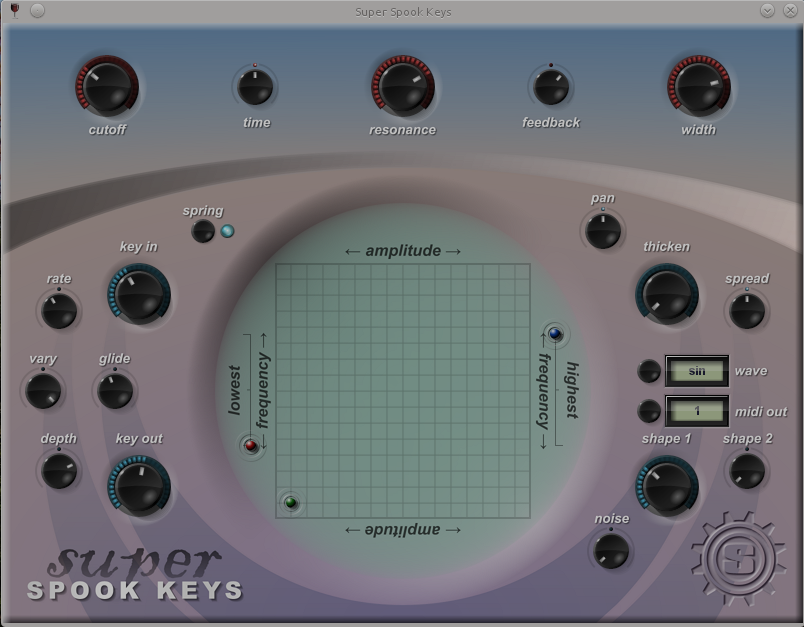
On the software side: first of all I have searched for an existing program which could reproduce the Theremin sound: there are a few, one very interesting is written in Python but it works only with OSS, and the Alsa emulation does not work at all (Ubuntu does not support OSS since a couple of years); there is also a CSound library, but it did not sound that well. In the end, I have decided to use this free VST effect, which is not free software (unfortunately), but has many different options and it also shows a MIDI input, so it can be driven using MIDI CC #60 and #61 (for x and y directions).

Super Spook Keys

Super Spook Keys

The Arduino program is very simple: it reads values from both the sensors, collecting five consecutive values; after that, it computes the mean of the values (for smoothing the signal) and sends it through the serial line as MIDI messages, then it repeats. The two leds are set a value proportional to the sensors, and if one of the two buttons is pressed, the corresponding sensor is blocked to the last valid value, so that (for example) the volume can be blocked while the pitch is changed, or viceversa.

Conclusions

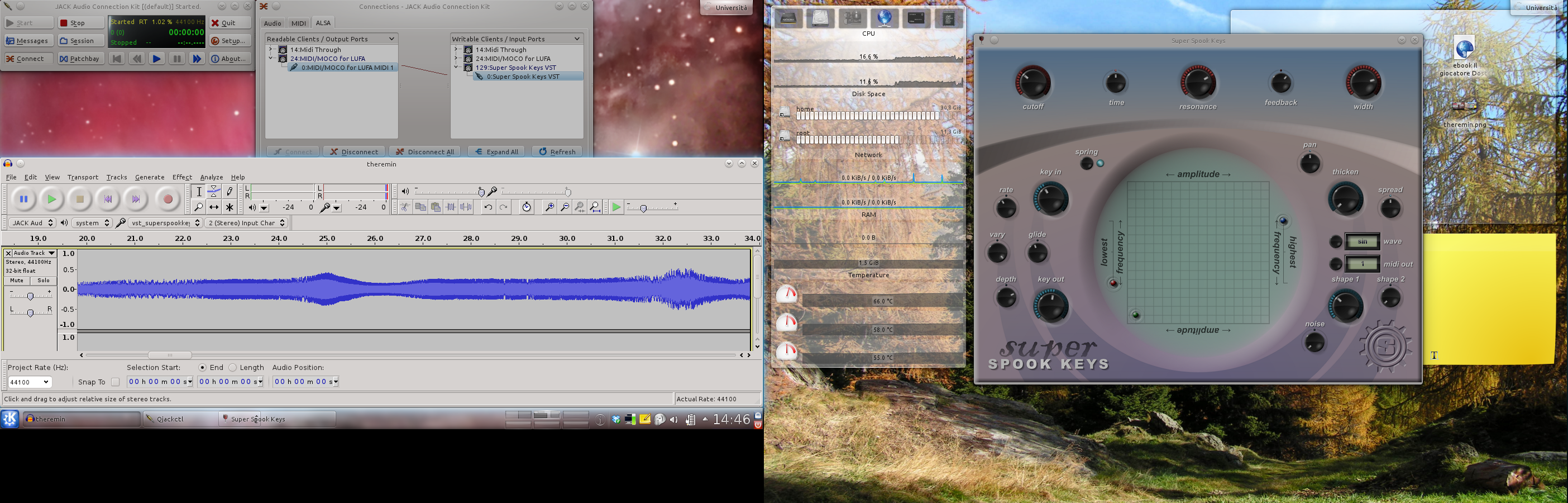
Recording session

Recording session

Quite fun, again: I have also added all the components to a prototipying shield, so that as soon as a new enclosure arrives, I will be able to move everything together and close up my third Arduino circuit of the summer; you can briefly see part of that shield in the first video, although it is not in use yet.

Let me know if you want any detail…

P.S.

Webcam recording on Linux (or, at least, on Ubuntu 11.04) sucks: mencoder exited with floating point exception ( :-O ), ffmpeg just crashed, the same for Cheese; in the end, GStreamer saved me (and allowed me to easily record the second video), with the definitive pipeline:

gst-launch-0.10 v4l2src device=/dev/video1 !
 'video/x-raw-yuv,width=640,height=480,framerate=30/1' !
 tee name=t_vid ! queue ! xvimagesink sync=false t_vid. !
 queue ! videorate ! 'video/x-raw-yuv,framerate=30/1' !
 queue ! mux. alsasrc device=hw:0,0 !
 audio/x-raw-int,rate=48000,channels=2,depth=16 ! queue !
 audioconvert ! queue ! mux. avimux name=mux !
 filesink location=webcam.avi

Read Full Post »

Linus Benedict Torvalds
Aug 26 1991, 2:12 am

Hello everybody out there using minix –

I’m doing a (free) operating system (just a hobby, won’t be big and
professional like gnu) for 386(486) AT clones.  This has been brewing
since april, and is starting to get ready.  I’d like any feedback on
things people like/dislike in minix, as my OS resembles it somewhat
(same physical layout of the file-system (due to practical reasons)
among other things).

I’ve currently ported bash(1.08) and gcc(1.40), and things seem to work.
This implies that I’ll get something practical within a few months, and
I’d like to know what features most people would want.  Any suggestions
are welcome, but I won’t promise I’ll implement them 😀

Linus (torvalds@kruuna.helsinki.fi)

PS.  Yes – it’s free of any minix code, and it has a multi-threaded fs.
It is NOT portable (uses 386 task switching etc), and it probably never
will support anything other than AT-harddisks, as that’s all I have 😦 .

Read Full Post »

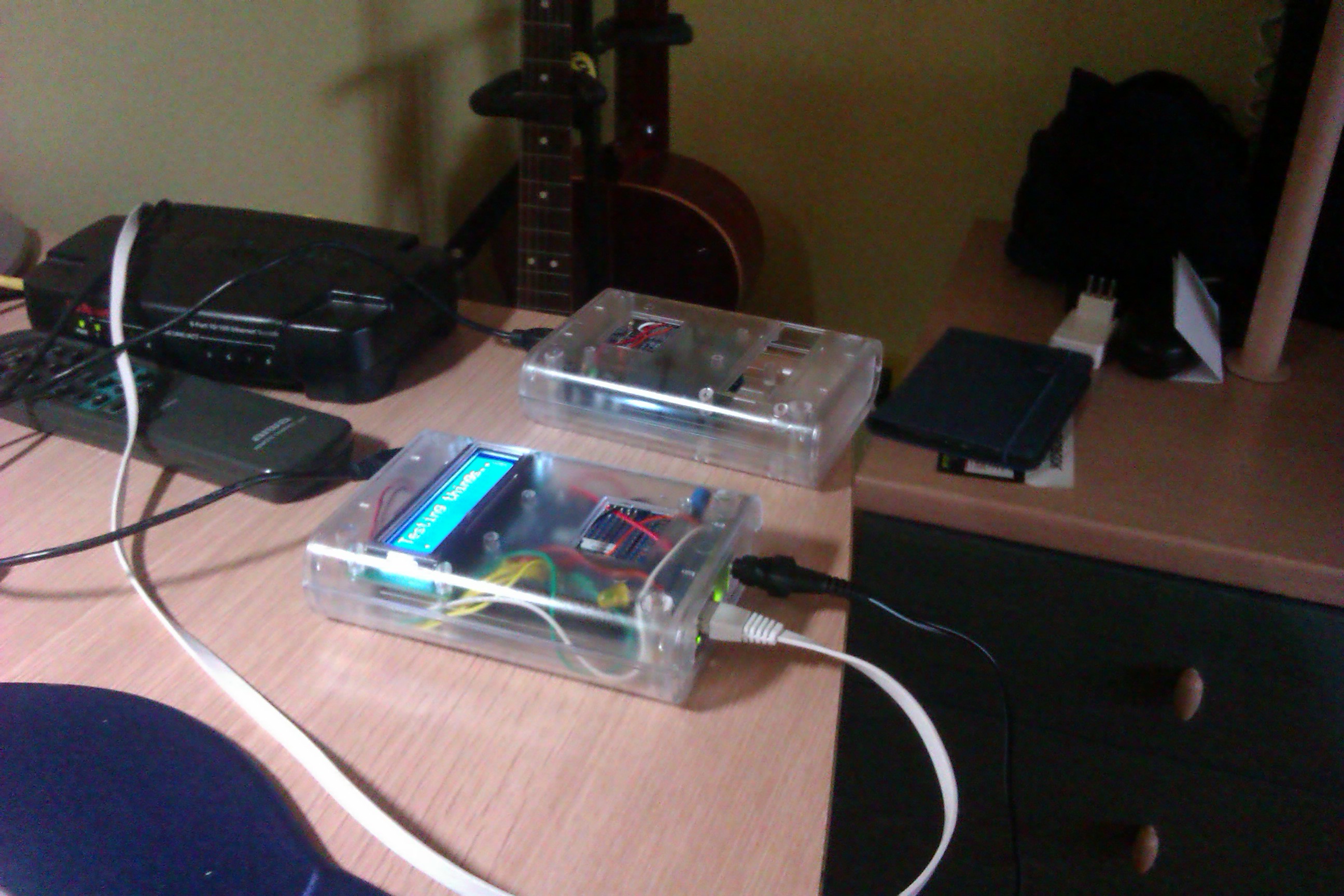
Arduini

Arduini

Oggi è arrivato l’LCD da 16×2, e così ho potuto inscatolare il secondo dei miei due progettini estivi fatti con l’Arduino; come potete vedere in figura:

  • sullo sfondo c’è un lettore ad infrarossi, che ho accoppiato al telecomando (sulla sinistra) del mio vecchio impianto stereo; per interfacciarlo al PC, dato che francamente con LIRC non ne sono uscito, mi sono scritto 20 righe di Python e comando direttamente Amarok via DBus; presto aggiungerò qualche riga per comandare anche VLC, ed a quel punto direi che è fatta… il circuito ha praticamente solo il ricevitore IR (ed un LED, tanto per illuminare qualcosa), quindi lo sforzo è stato decisamente basso.
  • In primo piano, invece, c’è il buon Tweetino: è un po’ un peccato che lo schermo adatto a quel case sia necessariamente così piccolo, per il resto tutto funziona egregiamente; dopo aver risolto il bug della libreria Base64 ed uno stack overflow che mi era sfuggito, l’interfacciamento sulla rete non dà problemi ed i tweet vengono correttamente visualizzati (spesso abbreviati) sullo schermo. Devo ammettere che scrivere il software è stata la parte più divertente, e vedere il tutto funzionare correttamente è decisamente soddisfacente.
E questo è quanto: ormai l’estate è finita (anche se Qualcuno lassù ha evidentemente sbagliato ad impostare il termostato…), e devo ricominciare a fare cose serie; in realtà è rimasta una piccola ideuzza, ma per attuarla devo aspettare che mi arrivino alcuni componenti (tra cui un accelerometro, e non dico altro…). Nel caso, scriverò ulteriori aggiornamenti.

Read Full Post »

Perchè nessuno mi dice le cose importanti? I pin analog in dell’Arduino (A0-A5) sono in realtà GPIO, e si possono quindi usare anche come output! Questo cambia parecchio le cose, soprattutto nei circuiti con l’interfaccia ethernet e l’LCD, che da soli portano via 12 pin digitali…

Read Full Post »

L’evoluzione naturale, dopo aver giocato in lungo ed in largo con l’Arduino, è unire Processing al tutto e vedere cosa emerge… alcune seghe mentali sono già on their way, questo post si limita a mostrare come catturare un video su Linux (ed applicare un effetto real time, già che ci siamo).

Come mai un post dedicato, qualcuno si chiederà… bè, perchè se siete su Linux dovete fare qualche rapida ricerchina per poter catturare video da webcam direttamente da Processing, dato che la libreria di default funziona solo su Mac e Windows (testata peraltro da me su quest’ultimo, e va); per fortuna, qualche anima pia della community ha creato una seconda libreria che sfrutta l’amato (?) GStreamer e ci permette di sfruttare come si deve l’amato sistema operativo.

L’installazione è estremamente semplice, di fatto si tratta di estrarre l’archivio nella cartella libraries (a proposito: lo sapevate che tale cartella si può collocare, in Processing come in Arduino, dentro la cartella degli sketch? Estremamente comoda se condivisa su Dropbox tra computer diversi!), ed il gioco è fatto: tra gli esempi, appaiono ora anche quelli di GSVideo, pronti ad essere provati. Se avete un solo dispositivo video, quello verrà caricato di default, altrimenti dovreste specificare il device.

Se siete su sistemi a 64 bit, c’è da penare un filino: per prima cosa dovete sostituire la directory java dentro Processing con la versione del JDK a 64 bit (il default è solo a 32), o in alternativa fate un symlink alla directory del vostro sistema dove avete già il JDK, e successivamente bisogna sostituire le librerie OpenGL in modes/java/libraries/opengl/library/linux64 con quelle installate nel vostro sistema (per fare questo dovrete installare libjogl per Java (su Debian/Ubuntu c’è l’apposito pacchetto, suppongo ci sia anche sulle altre distro)), con alcuni pratici symlink. Far partire Processing con linux32 non è purtroppo sufficiente…

Riguardo il video: ho messo assieme l’esempio che renderizza la differenza tra due frame successivi con quello che salva il video su file, e mi sono ripreso con la webcam mentre suonavo; il video non contiene audio, dato che il punto era mostrare che GSVideo funziona, non tanto registrare le note suonate; verranno esempi più avanti in cui metterò assieme diverse cose, ora come ora va bene così.

Se siete interessati, il file lo potete trovare qui (l’ho nominato con estensione java, così che Gist lo riconoscesse con la sintassi giusta, ma in realtà è un file pde).

Postilla

Nella registrazione avevo impostato gli fps del file salvato a 25, ma mi sono reso conto che il valore reale si aggirava attorno a 15, ovvero il video finale era accelerato rispetto alla realtà; semmai a qualcuno servisse, ecco il comando per diminuire gli fps usando ffmpeg e yuvfps (con probabile perdita di qualità, ma se volete un lavoro fatto meglio fate qualche esperimento di cattura e verificate che gli fps in output siano corretti direttamente alla fonte, invece che rimediare in un secondo momento…):

ffmpeg -i video.avi -f yuv4mpegpipe - | yuvfps -s 30:1 -r 30:1 |
 ffmpeg -f yuv4mpegpipe -i  - -b 28800k  slow.avi

Ovviamente sostituite al parametro b il valore di qualità in uscita che preferite…

Read Full Post »

Ubuntu 11.10

Ubuntu 11.10

Bè, si potrà dire quel che si vuole, ma di certo non si può non ammettere che Canonical si sta muovendo verso una direzione decisamente interessante… quantomeno nel differenziarsi dalla concorrenza!

Read Full Post »

« Newer Posts - Older Posts »